注意
点击 这里 下载完整示例代码
使用CTC解码器进行ASR推理
作者: Caroline Chen
本教程演示了如何使用带有词典约束和 KenLM 语言模型支持的 CTC 贝叶斯搜索解码器进行语音识别推理。我们将在一个使用 CTC 损失训练的预训练 wav2vec 2.0 模型上展示这一过程。
概述
束搜索解码通过迭代扩展文本假设(束),使用下一个可能的字符,并在每个时间步仅保留得分最高的假设。可以将语言模型纳入评分计算中,添加词典约束可以限制假设的下一个可能标记,使得只能生成词典中的词语。
底层实现是从 Flashlight 的 束搜索解码器移植而来的。解码器优化的数学公式可以在 Wav2Letter 论文 中找到, 更详细的算法可以在这篇 博客 中找到。
使用带有语言模型和词典约束的CTC Beam Search解码器运行ASR推理需要以下组件
声学模型:从音频波形预测语音特征的模型
Tokens: 语音模型可能预测的标记
词典:可能的单词与对应标记序列之间的映射
语言模型 (LM): 使用 KenLM 库 训练的 n-gram 语言模型,或继承自
CTCDecoderLM的自定义语言模型
声学模型与设置
首先我们导入必要的工具并获取我们正在使用的数据
import torch
import torchaudio

print(torch.__version__)
print(torchaudio.__version__)
2.1.1
2.1.0
import time
from typing import List

import IPython
import matplotlib.pyplot as plt
from torchaudio.models.decoder import ctc_decoder
from torchaudio.utils import download_asset
我们使用在 Wav2Vec 2.0
基础模型上微调的10分钟 LibriSpeech
数据集,可以通过
torchaudio.pipelines.WAV2VEC2_ASR_BASE_10M 加载。
有关在 torchaudio 中运行 Wav2Vec 2.0 语音
识别流水线的更多详细信息,请参阅 本教程。
bundle = torchaudio.pipelines.WAV2VEC2_ASR_BASE_10M
acoustic_model = bundle.get_model()
Downloading: "https://download.pytorch.org/torchaudio/models/wav2vec2_fairseq_base_ls960_asr_ll10m.pth" to /root/.cache/torch/hub/checkpoints/wav2vec2_fairseq_base_ls960_asr_ll10m.pth

  0%|          | 0.00/360M [00:00<?, ?B/s]
 12%|#1        | 42.2M/360M [00:00<00:00, 442MB/s]
 24%|##3       | 86.4M/360M [00:00<00:00, 455MB/s]
 36%|###6      | 130M/360M [00:00<00:00, 457MB/s]
 48%|####8     | 174M/360M [00:00<00:00, 459MB/s]
 61%|######    | 218M/360M [00:00<00:00, 457MB/s]
 73%|#######2  | 262M/360M [00:00<00:00, 458MB/s]
 85%|########4 | 306M/360M [00:00<00:00, 459MB/s]
 97%|#########7| 349M/360M [00:00<00:00, 459MB/s]
100%|##########| 360M/360M [00:00<00:00, 458MB/s]
我们将从 LibriSpeech test-other 数据集中加载一个样本。
speech_file = download_asset("tutorial-assets/ctc-decoding/1688-142285-0007.wav")

IPython.display.Audio(speech_file)
该音频文件对应的文本是
waveform, sample_rate = torchaudio.load(speech_file)

if sample_rate != bundle.sample_rate:
    waveform = torchaudio.functional.resample(waveform, sample_rate, bundle.sample_rate)
文件和数据用于解码器
接下来,我们加载词元、词典和语言模型数据,这些数据用于解码器根据声学模型的输出预测词语。LibriSpeech 数据集的预训练文件可以通过 torchaudio 下载,或者用户也可以提供自己的文件。
Tokens
这些符号是声学模型可以预测的可能符号,包括空白符号和静音符号。它们既可以作为文件传入,每行对应相同索引的符号,也可以作为符号列表传入,每个符号映射到唯一的索引。
# tokens.txt
_
|
e
t
...
['-', '|', 'e', 't', 'a', 'o', 'n', 'i', 'h', 's', 'r', 'd', 'l', 'u', 'm', 'w', 'c', 'f', 'g', 'y', 'p', 'b', 'v', 'k', "'", 'x', 'j', 'q', 'z']
术语表
词典是将单词映射到其对应标记序列的映射,用于将解码器的搜索空间限制为仅来自词典中的单词。词典文件的预期格式是每行一个单词,单词后跟由空格分隔的标记。
# lexcion.txt
a a |
able a b l e |
about a b o u t |
...
...
语言模型
在解码过程中,可以使用语言模型来改进结果,方法是将代表序列可能性的语言模型得分纳入到束搜索计算中。下面,我们将概述支持用于解码的不同形式的语言模型。
无语言模型
要创建一个不带语言模型的解码器实例,请在初始化解码器时将 lm=None 设置为参数。
KenLM
这是一个使用 KenLM库 训练的n-gram语言模型。可以使用 .arpa 或者二进制化的 .bin 语言模型,但推荐使用二进制格式以加快加载速度。
本教程中使用的语言模型是一个使用 LibriSpeech训练的4-gram KenLM。
自定义语言模型
用户可以使用 Python 定义自己的自定义语言模型,无论是统计语言模型还是神经网络语言模型,只需使用
CTCDecoderLM 和
CTCDecoderLMState。
例如,以下代码创建了一个围绕 PyTorch
torch.nn.Module 语言模型的基本包装器。
from torchaudio.models.decoder import CTCDecoderLM, CTCDecoderLMState


class CustomLM(CTCDecoderLM):
    """Create a Python wrapper around `language_model` to feed to the decoder."""

    def __init__(self, language_model: torch.nn.Module):
        CTCDecoderLM.__init__(self)
        self.language_model = language_model
        self.sil = -1  # index for silent token in the language model
        self.states = {}

        language_model.eval()

    def start(self, start_with_nothing: bool = False):
        state = CTCDecoderLMState()
        with torch.no_grad():
            score = self.language_model(self.sil)

        self.states[state] = score
        return state

    def score(self, state: CTCDecoderLMState, token_index: int):
        outstate = state.child(token_index)
        if outstate not in self.states:
            score = self.language_model(token_index)
            self.states[outstate] = score
        score = self.states[outstate]

        return outstate, score

    def finish(self, state: CTCDecoderLMState):
        return self.score(state, self.sil)
下载预训练文件
LibriSpeech 数据集的预训练文件可以使用
download_pretrained_files()下载。
注意:由于语言模型可能较大,此单元格运行可能需要几分钟。
from torchaudio.models.decoder import download_pretrained_files

files = download_pretrained_files("librispeech-4-gram")

print(files)
  0%|          | 0.00/4.97M [00:00<?, ?B/s]
100%|##########| 4.97M/4.97M [00:00<00:00, 398MB/s]

  0%|          | 0.00/57.0 [00:00<?, ?B/s]
100%|##########| 57.0/57.0 [00:00<00:00, 96.4kB/s]

  0%|          | 0.00/2.91G [00:00<?, ?B/s]
  1%|1         | 36.1M/2.91G [00:00<00:08, 378MB/s]
  2%|2         | 73.5M/2.91G [00:00<00:07, 386MB/s]
  4%|3         | 113M/2.91G [00:00<00:07, 401MB/s]
  5%|5         | 154M/2.91G [00:00<00:07, 411MB/s]
  7%|6         | 194M/2.91G [00:00<00:07, 415MB/s]
  8%|7         | 235M/2.91G [00:00<00:06, 417MB/s]
  9%|9         | 274M/2.91G [00:00<00:06, 418MB/s]
 11%|#         | 315M/2.91G [00:00<00:06, 419MB/s]
 12%|#1        | 355M/2.91G [00:00<00:06, 419MB/s]
 13%|#3        | 395M/2.91G [00:01<00:06, 419MB/s]
 15%|#4        | 435M/2.91G [00:01<00:06, 419MB/s]
 16%|#5        | 475M/2.91G [00:01<00:06, 418MB/s]
 17%|#7        | 515M/2.91G [00:01<00:06, 419MB/s]
 19%|#8        | 555M/2.91G [00:01<00:06, 420MB/s]
 20%|##        | 596M/2.91G [00:01<00:05, 422MB/s]
 21%|##1       | 636M/2.91G [00:01<00:05, 422MB/s]
 23%|##2       | 677M/2.91G [00:01<00:05, 423MB/s]
 24%|##4       | 718M/2.91G [00:01<00:05, 424MB/s]
 25%|##5       | 759M/2.91G [00:01<00:05, 426MB/s]
 27%|##6       | 799M/2.91G [00:02<00:05, 425MB/s]
 28%|##8       | 840M/2.91G [00:02<00:05, 419MB/s]
 30%|##9       | 880M/2.91G [00:02<00:05, 409MB/s]
 31%|###       | 919M/2.91G [00:02<00:05, 403MB/s]
 32%|###2      | 957M/2.91G [00:02<00:05, 397MB/s]
 33%|###3      | 995M/2.91G [00:02<00:05, 394MB/s]
 35%|###4      | 1.01G/2.91G [00:02<00:05, 392MB/s]
 36%|###5      | 1.05G/2.91G [00:02<00:05, 389MB/s]
 37%|###7      | 1.08G/2.91G [00:02<00:05, 391MB/s]
 39%|###8      | 1.12G/2.91G [00:02<00:04, 397MB/s]
 40%|###9      | 1.16G/2.91G [00:03<00:04, 403MB/s]
 41%|####1     | 1.20G/2.91G [00:03<00:04, 407MB/s]
 43%|####2     | 1.24G/2.91G [00:03<00:04, 411MB/s]
 44%|####3     | 1.28G/2.91G [00:03<00:04, 412MB/s]
 45%|####5     | 1.31G/2.91G [00:03<00:04, 413MB/s]
 47%|####6     | 1.36G/2.91G [00:03<00:03, 451MB/s]
 48%|####8     | 1.41G/2.91G [00:03<00:03, 428MB/s]
 50%|####9     | 1.45G/2.91G [00:03<00:03, 411MB/s]
 51%|#####1    | 1.49G/2.91G [00:03<00:03, 402MB/s]
 52%|#####2    | 1.52G/2.91G [00:03<00:03, 397MB/s]
 54%|#####3    | 1.56G/2.91G [00:04<00:03, 381MB/s]
 55%|#####4    | 1.60G/2.91G [00:04<00:03, 372MB/s]
 56%|#####6    | 1.63G/2.91G [00:04<00:03, 368MB/s]
 57%|#####7    | 1.66G/2.91G [00:04<00:03, 368MB/s]
 58%|#####8    | 1.70G/2.91G [00:04<00:03, 368MB/s]
 60%|#####9    | 1.73G/2.91G [00:04<00:03, 370MB/s]
 61%|######    | 1.77G/2.91G [00:04<00:03, 373MB/s]
 62%|######2   | 1.81G/2.91G [00:04<00:03, 375MB/s]
 63%|######3   | 1.84G/2.91G [00:04<00:03, 376MB/s]
 64%|######4   | 1.88G/2.91G [00:05<00:02, 375MB/s]
 66%|######5   | 1.91G/2.91G [00:05<00:02, 370MB/s]
 67%|######6   | 1.94G/2.91G [00:05<00:02, 356MB/s]
 68%|######7   | 1.98G/2.91G [00:05<00:03, 315MB/s]
 69%|######9   | 2.01G/2.91G [00:05<00:03, 320MB/s]
 70%|#######   | 2.04G/2.91G [00:05<00:03, 300MB/s]
 71%|#######1  | 2.07G/2.91G [00:05<00:02, 310MB/s]
 72%|#######2  | 2.10G/2.91G [00:05<00:02, 311MB/s]
 73%|#######3  | 2.13G/2.91G [00:05<00:02, 327MB/s]
 75%|#######4  | 2.17G/2.91G [00:06<00:02, 339MB/s]
 76%|#######5  | 2.20G/2.91G [00:06<00:02, 348MB/s]
 77%|#######6  | 2.24G/2.91G [00:06<00:02, 353MB/s]
 78%|#######8  | 2.27G/2.91G [00:06<00:01, 360MB/s]
 79%|#######9  | 2.31G/2.91G [00:06<00:01, 358MB/s]
 80%|########  | 2.34G/2.91G [00:06<00:02, 297MB/s]
 82%|########1 | 2.37G/2.91G [00:06<00:01, 314MB/s]
 83%|########2 | 2.41G/2.91G [00:06<00:01, 330MB/s]
 84%|########3 | 2.44G/2.91G [00:06<00:01, 329MB/s]
 85%|########5 | 2.47G/2.91G [00:06<00:01, 343MB/s]
 86%|########6 | 2.51G/2.91G [00:07<00:01, 353MB/s]
 87%|########7 | 2.55G/2.91G [00:07<00:01, 361MB/s]
 89%|########8 | 2.58G/2.91G [00:07<00:00, 368MB/s]
 90%|########9 | 2.62G/2.91G [00:07<00:00, 371MB/s]
 91%|#########1| 2.65G/2.91G [00:07<00:00, 376MB/s]
 92%|#########2| 2.69G/2.91G [00:07<00:00, 377MB/s]
 94%|#########3| 2.72G/2.91G [00:07<00:00, 380MB/s]
 95%|#########4| 2.76G/2.91G [00:07<00:00, 379MB/s]
 96%|#########6| 2.79G/2.91G [00:07<00:00, 380MB/s]
 97%|#########7| 2.83G/2.91G [00:07<00:00, 380MB/s]
 98%|#########8| 2.87G/2.91G [00:08<00:00, 381MB/s]
100%|#########9| 2.90G/2.91G [00:08<00:00, 366MB/s]
100%|##########| 2.91G/2.91G [00:08<00:00, 380MB/s]
PretrainedFiles(lexicon='/root/.cache/torch/hub/torchaudio/decoder-assets/librispeech-4-gram/lexicon.txt', tokens='/root/.cache/torch/hub/torchaudio/decoder-assets/librispeech-4-gram/tokens.txt', lm='/root/.cache/torch/hub/torchaudio/decoder-assets/librispeech-4-gram/lm.bin')
构建解码器
在本教程中,我们构建了一个束搜索解码器和一个贪婪解码器以进行比较。
束搜索解码器
解码器可以使用工厂函数
ctc_decoder()构建。
除了前面提到的组件外,它还接受各种束搜索解码参数和令牌/单词参数。
通过向 None 参数传入 lm,此解码器也可以在不使用语言模型的情况下运行。
LM_WEIGHT = 3.23
WORD_SCORE = -0.26

beam_search_decoder = ctc_decoder(
    lexicon=files.lexicon,
    tokens=files.tokens,
    lm=files.lm,
    nbest=3,
    beam_size=1500,
    lm_weight=LM_WEIGHT,
    word_score=WORD_SCORE,
)
贪婪解码器
class GreedyCTCDecoder(torch.nn.Module):
    def __init__(self, labels, blank=0):
        super().__init__()
        self.labels = labels
        self.blank = blank

    def forward(self, emission: torch.Tensor) -> List[str]:
        """Given a sequence emission over labels, get the best path
        Args:
          emission (Tensor): Logit tensors. Shape `[num_seq, num_label]`.

        Returns:
          List[str]: The resulting transcript
        """
        indices = torch.argmax(emission, dim=-1)  # [num_seq,]
        indices = torch.unique_consecutive(indices, dim=-1)
        indices = [i for i in indices if i != self.blank]
        joined = "".join([self.labels[i] for i in indices])
        return joined.replace("|", " ").strip().split()


greedy_decoder = GreedyCTCDecoder(tokens)
运行推理
现在我们已经拥有了数据、声学模型和解码器,可以执行推理。束搜索解码器的输出类型为
CTCHypothesis,包含预测的 token ID、对应的单词(如果提供了词典)、假设分数以及与 token ID 对应的时间步。回顾一下,与波形对应的转录文本是
actual_transcript = "i really was very much afraid of showing him how much shocked i was at some parts of what he said"
actual_transcript = actual_transcript.split()

emission, _ = acoustic_model(waveform)
贪婪解码器给出以下结果。
greedy_result = greedy_decoder(emission[0])
greedy_transcript = " ".join(greedy_result)
greedy_wer = torchaudio.functional.edit_distance(actual_transcript, greedy_result) / len(actual_transcript)

print(f"Transcript: {greedy_transcript}")
print(f"WER: {greedy_wer}")
Transcript: i reily was very much affrayd of showing him howmuch shoktd i wause at some parte of what he seid
WER: 0.38095238095238093
使用束搜索解码器:
beam_search_result = beam_search_decoder(emission)
beam_search_transcript = " ".join(beam_search_result[0][0].words).strip()
beam_search_wer = torchaudio.functional.edit_distance(actual_transcript, beam_search_result[0][0].words) / len(
    actual_transcript
)

print(f"Transcript: {beam_search_transcript}")
print(f"WER: {beam_search_wer}")
Transcript: i really was very much afraid of showing him how much shocked i was at some part of what he said
WER: 0.047619047619047616
注意
如果未向解码器提供词典,输出假设的 words 字段将为空。要检索无词典解码的转录文本,您可以执行以下操作以获取令牌索引,将它们转换为原始令牌,然后将它们连接在一起。
tokens_str = "".join(beam_search_decoder.idxs_to_tokens(beam_search_result[0][0].tokens))
transcript = " ".join(tokens_str.split("|"))
我们发现,使用词典约束束搜索解码器生成的转录结果更为准确,由真实单词组成;而贪婪解码器则可能预测出拼写错误的单词,如"affrayd"和"shoktd"。
增量解码
如果输入语音较长,可以以增量方式解码发射概率。
您需要首先使用
decode_begin()初始化解码器的内部状态。
beam_search_decoder.decode_begin()
然后,您可以将发射传递给
decode_begin()。
这里我们使用相同的发射,但每次向解码器传递一帧。
最后,完成解码器的内部状态,并获取结果。
beam_search_decoder.decode_end()
beam_search_result_inc = beam_search_decoder.get_final_hypothesis()
增量解码的结果与批量解码完全相同。
beam_search_transcript_inc = " ".join(beam_search_result_inc[0].words).strip()
beam_search_wer_inc = torchaudio.functional.edit_distance(
    actual_transcript, beam_search_result_inc[0].words) / len(actual_transcript)

print(f"Transcript: {beam_search_transcript_inc}")
print(f"WER: {beam_search_wer_inc}")

assert beam_search_result[0][0].words == beam_search_result_inc[0].words
assert beam_search_result[0][0].score == beam_search_result_inc[0].score
torch.testing.assert_close(beam_search_result[0][0].timesteps, beam_search_result_inc[0].timesteps)
Transcript: i really was very much afraid of showing him how much shocked i was at some part of what he said
WER: 0.047619047619047616
时间步对齐
请注意,生成的假设的组成部分之一是与时令 ID 对应的时间步。
timesteps = beam_search_result[0][0].timesteps
predicted_tokens = beam_search_decoder.idxs_to_tokens(beam_search_result[0][0].tokens)

print(predicted_tokens, len(predicted_tokens))
print(timesteps, timesteps.shape[0])
['|', 'i', '|', 'r', 'e', 'a', 'l', 'l', 'y', '|', 'w', 'a', 's', '|', 'v', 'e', 'r', 'y', '|', 'm', 'u', 'c', 'h', '|', 'a', 'f', 'r', 'a', 'i', 'd', '|', 'o', 'f', '|', 's', 'h', 'o', 'w', 'i', 'n', 'g', '|', 'h', 'i', 'm', '|', 'h', 'o', 'w', '|', 'm', 'u', 'c', 'h', '|', 's', 'h', 'o', 'c', 'k', 'e', 'd', '|', 'i', '|', 'w', 'a', 's', '|', 'a', 't', '|', 's', 'o', 'm', 'e', '|', 'p', 'a', 'r', 't', '|', 'o', 'f', '|', 'w', 'h', 'a', 't', '|', 'h', 'e', '|', 's', 'a', 'i', 'd', '|', '|'] 99
tensor([  0,  31,  33,  36,  39,  41,  42,  44,  46,  48,  49,  52,  54,  58,
         64,  66,  69,  73,  74,  76,  80,  82,  84,  86,  88,  94,  97, 107,
        111, 112, 116, 134, 136, 138, 140, 142, 146, 148, 151, 153, 155, 157,
        159, 161, 162, 166, 170, 176, 177, 178, 179, 182, 184, 186, 187, 191,
        193, 198, 201, 202, 203, 205, 207, 212, 213, 216, 222, 224, 230, 250,
        251, 254, 256, 261, 262, 264, 267, 270, 276, 277, 281, 284, 288, 289,
        292, 295, 297, 299, 300, 303, 305, 307, 310, 311, 324, 325, 329, 331,
        353], dtype=torch.int32) 99
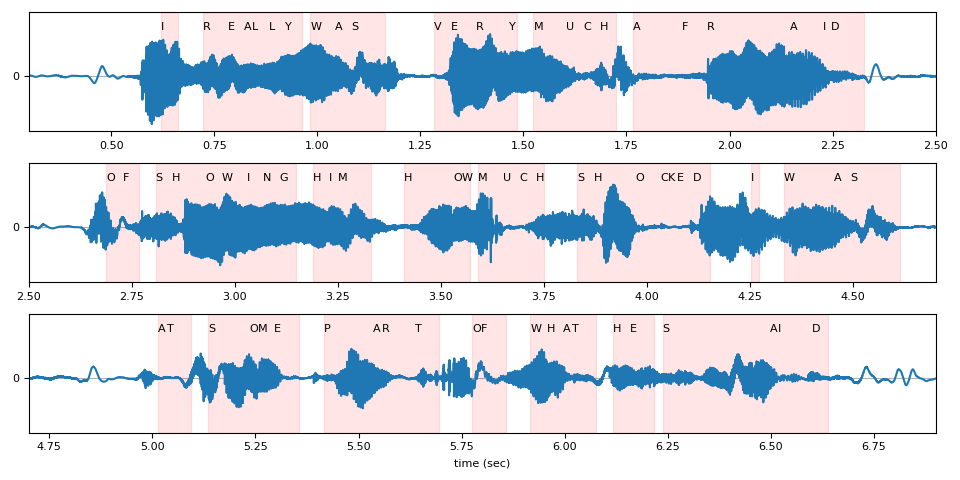
在下图中,我们可视化了相对于原始波形的 token 时间步对齐情况。
def plot_alignments(waveform, emission, tokens, timesteps, sample_rate):

    t = torch.arange(waveform.size(0)) / sample_rate
    ratio = waveform.size(0) / emission.size(1) / sample_rate

    chars = []
    words = []
    word_start = None
    for token, timestep in zip(tokens, timesteps * ratio):
        if token == "|":
            if word_start is not None:
                words.append((word_start, timestep))
            word_start = None
        else:
            chars.append((token, timestep))
            if word_start is None:
                word_start = timestep

    fig, axes = plt.subplots(3, 1)

    def _plot(ax, xlim):
        ax.plot(t, waveform)
        for token, timestep in chars:
            ax.annotate(token.upper(), (timestep, 0.5))
        for word_start, word_end in words:
            ax.axvspan(word_start, word_end, alpha=0.1, color="red")
        ax.set_ylim(-0.6, 0.7)
        ax.set_yticks([0])
        ax.grid(True, axis="y")
        ax.set_xlim(xlim)

    _plot(axes[0], (0.3, 2.5))
    _plot(axes[1], (2.5, 4.7))
    _plot(axes[2], (4.7, 6.9))
    axes[2].set_xlabel("time (sec)")
    fig.tight_layout()


plot_alignments(waveform[0], emission, predicted_tokens, timesteps, bundle.sample_rate)
Beam Search Decoder Parameters
在本节中,我们将更深入地探讨一些不同的参数和权衡。有关可自定义参数的完整列表,请参阅
documentation。
辅助函数
def print_decoded(decoder, emission, param, param_value):
    start_time = time.monotonic()
    result = decoder(emission)
    decode_time = time.monotonic() - start_time

    transcript = " ".join(result[0][0].words).lower().strip()
    score = result[0][0].score
    print(f"{param} {param_value:<3}: {transcript} (score: {score:.2f}; {decode_time:.4f} secs)")
nbest
此参数指示要返回的最佳假设数量,这是贪婪解码器无法实现的属性。例如,通过在之前构建束搜索解码器时将 nbest=3 设置为该值,我们现在可以访问得分最高的前 3 个假设。
for i in range(3):
    transcript = " ".join(beam_search_result[0][i].words).strip()
    score = beam_search_result[0][i].score
    print(f"{transcript} (score: {score})")
i really was very much afraid of showing him how much shocked i was at some part of what he said (score: 3699.82506731033)
i really was very much afraid of showing him how much shocked i was at some parts of what he said (score: 3697.8593242037264)
i reply was very much afraid of showing him how much shocked i was at some part of what he said (score: 3695.0167120099036)
束宽
beam_size 参数决定了在每个解码步骤后保留的最佳假设的最大数量。使用更大的束宽(beam size)可以探索更大范围的潜在假设,从而可能生成得分更高的假设,但这在计算上更为昂贵,并且在达到某个临界点后不会带来额外的收益。
在下方的示例中,我们看到随着束宽从 1 增加到 5 再到 50,解码质量有所提升,但请注意,使用束宽 500 产生的输出与束宽 50 相同,却增加了计算时间。
beam_sizes = [1, 5, 50, 500]

for beam_size in beam_sizes:
    beam_search_decoder = ctc_decoder(
        lexicon=files.lexicon,
        tokens=files.tokens,
        lm=files.lm,
        beam_size=beam_size,
        lm_weight=LM_WEIGHT,
        word_score=WORD_SCORE,
    )

    print_decoded(beam_search_decoder, emission, "beam size", beam_size)
beam size 1  : i you ery much afra of shongut shot i was at some arte what he sad (score: 3144.93; 0.0448 secs)
beam size 5  : i rely was very much afraid of showing him how much shot i was at some parts of what he said (score: 3688.02; 0.0486 secs)
beam size 50 : i really was very much afraid of showing him how much shocked i was at some part of what he said (score: 3699.83; 0.1638 secs)
beam size 500: i really was very much afraid of showing him how much shocked i was at some part of what he said (score: 3699.83; 0.5404 secs)
束大小 token
beam_size_token 参数对应于在解码步骤中为扩展每个假设所考虑的标记(token)数量。探索更多的下一个可能标记会增加潜在假设的范围,但代价是计算量增加。
num_tokens = len(tokens)
beam_size_tokens = [1, 5, 10, num_tokens]

for beam_size_token in beam_size_tokens:
    beam_search_decoder = ctc_decoder(
        lexicon=files.lexicon,
        tokens=files.tokens,
        lm=files.lm,
        beam_size_token=beam_size_token,
        lm_weight=LM_WEIGHT,
        word_score=WORD_SCORE,
    )

    print_decoded(beam_search_decoder, emission, "beam size token", beam_size_token)
beam size token 1  : i rely was very much affray of showing him hoch shot i was at some part of what he sed (score: 3584.80; 0.1585 secs)
beam size token 5  : i rely was very much afraid of showing him how much shocked i was at some part of what he said (score: 3694.83; 0.1762 secs)
beam size token 10 : i really was very much afraid of showing him how much shocked i was at some part of what he said (score: 3696.25; 0.1964 secs)
beam size token 29 : i really was very much afraid of showing him how much shocked i was at some part of what he said (score: 3699.83; 0.2270 secs)
束搜索阈值
beam_threshold 参数用于在每个解码步骤中修剪存储的假设集,移除得分与最高分假设相差超过 beam_threshold 的假设。需要在选择较小的阈值以修剪更多假设并减少搜索空间,以及选择足够大的阈值以避免修剪合理假设之间取得平衡。
beam_thresholds = [1, 5, 10, 25]

for beam_threshold in beam_thresholds:
    beam_search_decoder = ctc_decoder(
        lexicon=files.lexicon,
        tokens=files.tokens,
        lm=files.lm,
        beam_threshold=beam_threshold,
        lm_weight=LM_WEIGHT,
        word_score=WORD_SCORE,
    )

    print_decoded(beam_search_decoder, emission, "beam threshold", beam_threshold)
beam threshold 1  : i ila ery much afraid of shongut shot i was at some parts of what he said (score: 3316.20; 0.0288 secs)
beam threshold 5  : i rely was very much afraid of showing him how much shot i was at some parts of what he said (score: 3682.23; 0.0500 secs)
beam threshold 10 : i really was very much afraid of showing him how much shocked i was at some part of what he said (score: 3699.83; 0.2096 secs)
beam threshold 25 : i really was very much afraid of showing him how much shocked i was at some part of what he said (score: 3699.83; 0.2307 secs)
语言模型权重
lm_weight 参数是分配给语言模型分数的权重,该分数将与声学模型分数累加以确定总体分数。较大的权重会鼓励模型基于语言模型预测下一个词,而较小的权重则会给声学模型分数赋予更大的权重。
lm_weights = [0, LM_WEIGHT, 15]

for lm_weight in lm_weights:
    beam_search_decoder = ctc_decoder(
        lexicon=files.lexicon,
        tokens=files.tokens,
        lm=files.lm,
        lm_weight=lm_weight,
        word_score=WORD_SCORE,
    )

    print_decoded(beam_search_decoder, emission, "lm weight", lm_weight)
lm weight 0  : i rely was very much affraid of showing him ho much shoke i was at some parte of what he seid (score: 3834.06; 0.2535 secs)
lm weight 3.23: i really was very much afraid of showing him how much shocked i was at some part of what he said (score: 3699.83; 0.2596 secs)
lm weight 15 : was there in his was at some of what he said (score: 2918.99; 0.2378 secs)
其他参数
可优化的其他参数包括以下内容
word_score: 单词结束时添加的分数unk_score: 要添加的未知词出现分数sil_score: 要添加的静音外观分数log_add: 是否对词典 Trie 涂抹使用 log add
脚本的总运行时间: ( 1 分钟 54.127 秒)