注意
点击 这里 下载完整示例代码
使用 Wav2Vec2 进行强制对齐
作者 Moto Hira
本教程展示了如何使用CTC分割算法将转录与语音对齐,
torchaudio,该算法在
大型语料库的CTC分割用于德语端到端语音识别中进行了描述。
概述
对齐过程如下所示。
从音频波形估算帧级标签概率
生成表示时间步上标签对齐概率的网格矩阵。
从网格矩阵中找出最可能的路径。
在本示例中,我们使用 torchaudio 的 Wav2Vec2 模型进行声学特征提取。
准备
首先,我们导入必要的包,并获取我们要处理的数据。
# %matplotlib inline

import os
from dataclasses import dataclass

import torch
import torchaudio
import requests
import matplotlib
import matplotlib.pyplot as plt
import IPython

matplotlib.rcParams['figure.figsize'] = [16.0, 4.8]

torch.random.manual_seed(0)
device = torch.device('cuda' if torch.cuda.is_available() else 'cpu')

print(torch.__version__)
print(torchaudio.__version__)
print(device)

SPEECH_URL = 'https://download.pytorch.org/torchaudio/tutorial-assets/Lab41-SRI-VOiCES-src-sp0307-ch127535-sg0042.wav'
SPEECH_FILE = '_assets/speech.wav'

if not os.path.exists(SPEECH_FILE):
  os.makedirs('_assets', exist_ok=True)
  with open(SPEECH_FILE, 'wb') as file:
    file.write(requests.get(SPEECH_URL).content)
Out:
1.10.0+cpu
0.10.0+cpu
cpu
生成逐帧标签概率
第一步是生成每个音频帧的标签类别概率。我们可以使用为 ASR 训练的 Wav2Vec2 模型。这里我们使用
torchaudio.pipelines.WAV2VEC2_ASR_BASE_960H()。
torchaudio 提供对带有相关标签的预训练模型的便捷访问。
注意
在后续部分,我们将在对数域中计算概率以避免数值不稳定。为此,我们将 emission 与 torch.log_softmax() 进行归一化。
bundle = torchaudio.pipelines.WAV2VEC2_ASR_BASE_960H
model = bundle.get_model().to(device)
labels = bundle.get_labels()
with torch.inference_mode():
  waveform, _ = torchaudio.load(SPEECH_FILE)
  emissions, _ = model(waveform.to(device))
  emissions = torch.log_softmax(emissions, dim=-1)

emission = emissions[0].cpu().detach()
可视化
print(labels)
plt.imshow(emission.T)
plt.colorbar()
plt.title("Frame-wise class probability")
plt.xlabel("Time")
plt.ylabel("Labels")
plt.show()
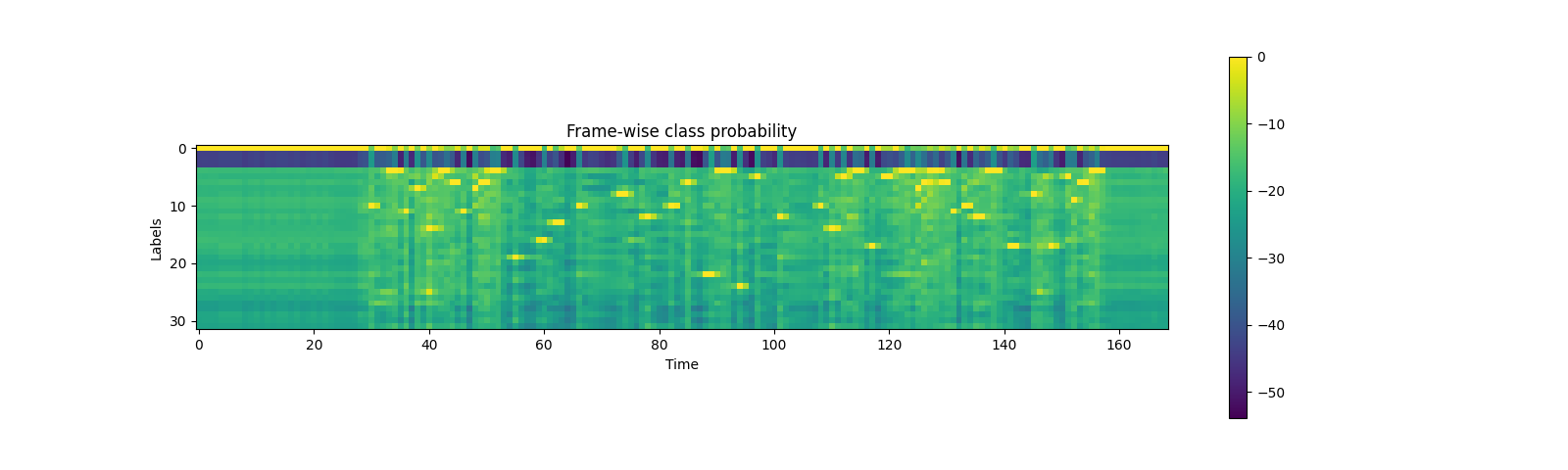
Out:
('<s>', '<pad>', '</s>', '<unk>', '|', 'E', 'T', 'A', 'O', 'N', 'I', 'H', 'S', 'R', 'D', 'L', 'U', 'M', 'W', 'C', 'F', 'G', 'Y', 'P', 'B', 'V', 'K', "'", 'X', 'J', 'Q', 'Z')
生成对齐概率(网格)
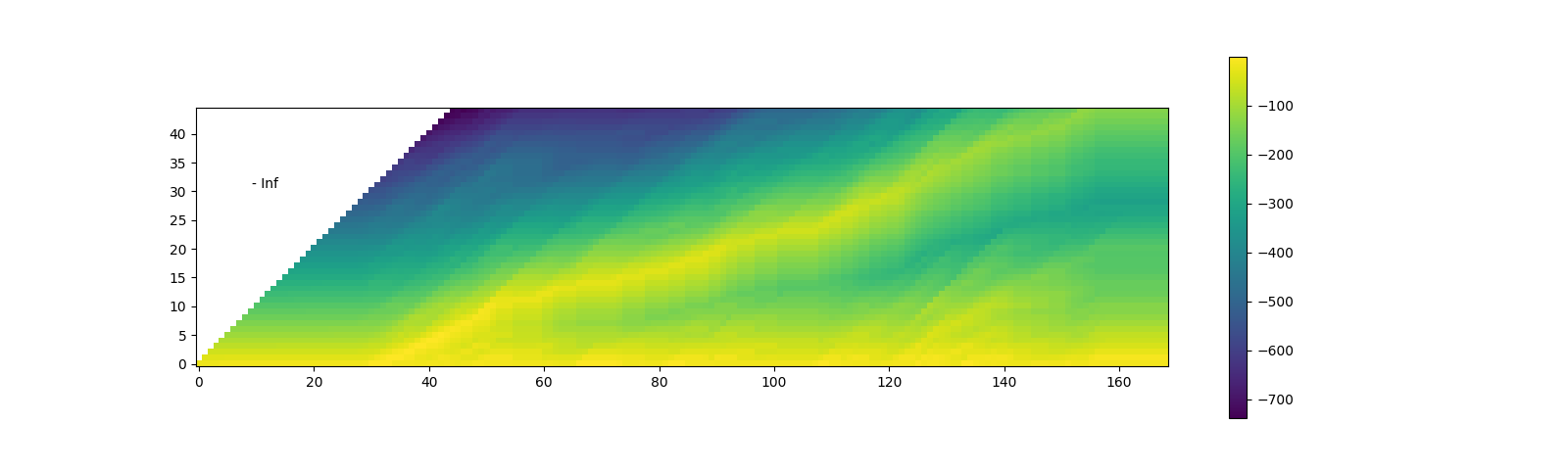
从发射矩阵出发,接下来我们生成格状图(trellis),它表示在每一时间帧上出现转录标签的概率。
Trellis 是一个具有时间轴和标签轴的二维矩阵。标签轴代表我们正在对齐的转录文本。在下文中,我们使用 \(t\) 表示时间轴的索引,使用 \(j\) 表示标签轴的索引。\(c_j\) 表示标签索引为 \(j\) 处的标签。
为了生成时间步 \(t+1\) 的概率,我们查看来自时间步 \(t\) 的格网以及时间步 \(t+1\) 的发射概率。有两条路径可以到达带有标签 \(c_{j+1}\) 的时间步 \(t+1\)。第一种情况是,在 \(t\) 时刻标签为 \(c_{j+1}\),且从 \(t\) 到 \(t+1\) 期间标签未发生变化。另一种情况是,在 \(t\) 时刻标签为 \(c_j\),并在 \(t+1\) 时刻转换到了下一个标签 \(c_{j+1}\)。
下图说明了这一转变。
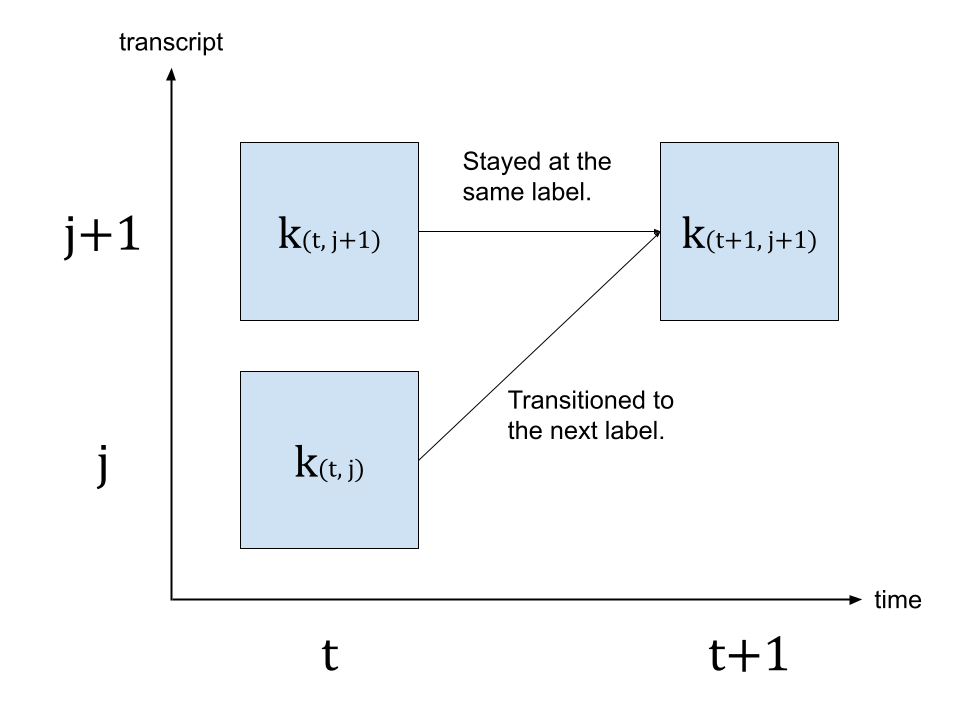
由于我们要寻找最可能的状态转移,因此我们选择概率更高的路径作为 \(k_{(t+1, j+1)}\) 的值,即
\(k_{(t+1, j+1)} = max( k_{(t, j)} p(t+1, c_{j+1}), k_{(t, j+1)} p(t+1, repeat) )\)
其中 \(k\) 代表网格矩阵,而 \(p(t, c_j)\) 代表时间步 \(t\) 处标签 \(c_j\) 的概率。 \(repeat\) 代表来自 CTC 公式的空白标记。(有关 CTC 算法的详细信息,请参阅《使用 CTC 进行序列建模》 [distill.pub])
transcript = 'I|HAD|THAT|CURIOSITY|BESIDE|ME|AT|THIS|MOMENT'
dictionary  = {c: i for i, c in enumerate(labels)}

tokens = [dictionary[c] for c in transcript]
print(list(zip(transcript, tokens)))

def get_trellis(emission, tokens, blank_id=0):
  num_frame = emission.size(0)
  num_tokens = len(tokens)

  # Trellis has extra diemsions for both time axis and tokens.
  # The extra dim for tokens represents <SoS> (start-of-sentence)
  # The extra dim for time axis is for simplification of the code.
  trellis = torch.full((num_frame+1, num_tokens+1), -float('inf'))
  trellis[:, 0] = 0
  for t in range(num_frame):
    trellis[t+1, 1:] = torch.maximum(
        # Score for staying at the same token
        trellis[t, 1:] + emission[t, blank_id],
        # Score for changing to the next token
        trellis[t, :-1] + emission[t, tokens],
    )
  return trellis

trellis = get_trellis(emission, tokens)
Out:
[('I', 10), ('|', 4), ('H', 11), ('A', 7), ('D', 14), ('|', 4), ('T', 6), ('H', 11), ('A', 7), ('T', 6), ('|', 4), ('C', 19), ('U', 16), ('R', 13), ('I', 10), ('O', 8), ('S', 12), ('I', 10), ('T', 6), ('Y', 22), ('|', 4), ('B', 24), ('E', 5), ('S', 12), ('I', 10), ('D', 14), ('E', 5), ('|', 4), ('M', 17), ('E', 5), ('|', 4), ('A', 7), ('T', 6), ('|', 4), ('T', 6), ('H', 11), ('I', 10), ('S', 12), ('|', 4), ('M', 17), ('O', 8), ('M', 17), ('E', 5), ('N', 9), ('T', 6)]
查找最可能的路径(回溯)
一旦生成网格,我们将沿着高概率元素对其进行遍历。
我们将从具有最高概率的时间步的最后一个标签索引开始,然后,我们逆时间遍历,根据后转换概率选择停留 (\(c_j \rightarrow c_j\)) 或转换 (\(c_j \rightarrow c_{j+1}\)),基于后转换概率 \(k_{t, j} p(t+1, c_{j+1})\) 或 \(k_{t, j+1} p(t+1, repeat)\)。
当标签到达起始位置时,过渡即完成。
Trellis 矩阵用于路径搜索,但对于每个片段的最终概率,我们采用来自发射矩阵的逐帧概率。
@dataclass
class Point:
  token_index: int
  time_index: int
  score: float


def backtrack(trellis, emission, tokens, blank_id=0):
  # Note:
  # j and t are indices for trellis, which has extra dimensions
  # for time and tokens at the beginning.
  # When refering to time frame index `T` in trellis,
  # the corresponding index in emission is `T-1`.
  # Similarly, when refering to token index `J` in trellis,
  # the corresponding index in transcript is `J-1`.
  j = trellis.size(1) - 1
  t_start = torch.argmax(trellis[:, j]).item()

  path = []
  for t in range(t_start, 0, -1):
    # 1. Figure out if the current position was stay or change
    # Note (again):
    # `emission[J-1]` is the emission at time frame `J` of trellis dimension.
    # Score for token staying the same from time frame J-1 to T.
    stayed = trellis[t-1, j] + emission[t-1, blank_id]
    # Score for token changing from C-1 at T-1 to J at T.
    changed = trellis[t-1, j-1] + emission[t-1, tokens[j-1]]

    # 2. Store the path with frame-wise probability.
    prob = emission[t-1, tokens[j-1] if changed > stayed else 0].exp().item()
    # Return token index and time index in non-trellis coordinate.
    path.append(Point(j-1, t-1, prob))

    # 3. Update the token
    if changed > stayed:
      j -= 1
      if j == 0:
        break
  else:
    raise ValueError('Failed to align')
  return path[::-1]

path = backtrack(trellis, emission, tokens)
print(path)
Out:
[Point(token_index=0, time_index=30, score=0.9999842643737793), Point(token_index=0, time_index=31, score=0.9846950173377991), Point(token_index=0, time_index=32, score=0.9999707937240601), Point(token_index=0, time_index=33, score=0.1540004163980484), Point(token_index=1, time_index=34, score=0.9999173879623413), Point(token_index=1, time_index=35, score=0.6080269813537598), Point(token_index=2, time_index=36, score=0.9997720122337341), Point(token_index=2, time_index=37, score=0.9997130036354065), Point(token_index=3, time_index=38, score=0.9999357461929321), Point(token_index=3, time_index=39, score=0.9861581325531006), Point(token_index=4, time_index=40, score=0.9238582253456116), Point(token_index=4, time_index=41, score=0.9257349967956543), Point(token_index=4, time_index=42, score=0.015662744641304016), Point(token_index=5, time_index=43, score=0.9998378753662109), Point(token_index=6, time_index=44, score=0.9988442659378052), Point(token_index=6, time_index=45, score=0.10144233703613281), Point(token_index=7, time_index=46, score=0.9999426603317261), Point(token_index=7, time_index=47, score=0.9999946355819702), Point(token_index=8, time_index=48, score=0.9979603290557861), Point(token_index=8, time_index=49, score=0.036036331206560135), Point(token_index=8, time_index=50, score=0.06162545830011368), Point(token_index=9, time_index=51, score=4.3326534068910405e-05), Point(token_index=10, time_index=52, score=0.999980092048645), Point(token_index=10, time_index=53, score=0.9967095851898193), Point(token_index=10, time_index=54, score=0.9999257326126099), Point(token_index=11, time_index=55, score=0.9999982118606567), Point(token_index=11, time_index=56, score=0.9990689158439636), Point(token_index=11, time_index=57, score=0.9999996423721313), Point(token_index=11, time_index=58, score=0.9999996423721313), Point(token_index=11, time_index=59, score=0.8457557559013367), Point(token_index=12, time_index=60, score=0.9999995231628418), Point(token_index=12, time_index=61, score=0.999601423740387), Point(token_index=13, time_index=62, score=0.999998927116394), Point(token_index=13, time_index=63, score=0.0035246757324784994), Point(token_index=13, time_index=64, score=1.0), Point(token_index=13, time_index=65, score=1.0), Point(token_index=14, time_index=66, score=0.9999916553497314), Point(token_index=14, time_index=67, score=0.9971591234207153), Point(token_index=14, time_index=68, score=0.9999990463256836), Point(token_index=14, time_index=69, score=0.9999991655349731), Point(token_index=14, time_index=70, score=0.9999998807907104), Point(token_index=14, time_index=71, score=0.9999998807907104), Point(token_index=14, time_index=72, score=0.9999881982803345), Point(token_index=14, time_index=73, score=0.011426654644310474), Point(token_index=15, time_index=74, score=0.9999978542327881), Point(token_index=15, time_index=75, score=0.9996134042739868), Point(token_index=15, time_index=76, score=0.999998927116394), Point(token_index=15, time_index=77, score=0.9727553129196167), Point(token_index=16, time_index=78, score=0.999998927116394), Point(token_index=16, time_index=79, score=0.9949328303337097), Point(token_index=16, time_index=80, score=0.999998927116394), Point(token_index=16, time_index=81, score=0.9999121427536011), Point(token_index=17, time_index=82, score=0.9999775886535645), Point(token_index=17, time_index=83, score=0.6576985716819763), Point(token_index=17, time_index=84, score=0.9984292387962341), Point(token_index=18, time_index=85, score=0.9999874830245972), Point(token_index=18, time_index=86, score=0.9993745684623718), Point(token_index=18, time_index=87, score=0.9999988079071045), Point(token_index=18, time_index=88, score=0.10424679517745972), Point(token_index=19, time_index=89, score=0.9999969005584717), Point(token_index=19, time_index=90, score=0.3978584110736847), Point(token_index=20, time_index=91, score=0.9999933242797852), Point(token_index=20, time_index=92, score=1.6990968561003683e-06), Point(token_index=20, time_index=93, score=0.9861307740211487), Point(token_index=21, time_index=94, score=0.9999960660934448), Point(token_index=21, time_index=95, score=0.9992727637290955), Point(token_index=21, time_index=96, score=0.9993411898612976), Point(token_index=22, time_index=97, score=0.9999983310699463), Point(token_index=22, time_index=98, score=0.9999971389770508), Point(token_index=22, time_index=99, score=0.9999997615814209), Point(token_index=22, time_index=100, score=0.9999995231628418), Point(token_index=23, time_index=101, score=0.9999732971191406), Point(token_index=23, time_index=102, score=0.9983227849006653), Point(token_index=23, time_index=103, score=0.9999992847442627), Point(token_index=23, time_index=104, score=0.9999997615814209), Point(token_index=23, time_index=105, score=1.0), Point(token_index=23, time_index=106, score=1.0), Point(token_index=23, time_index=107, score=0.9998630285263062), Point(token_index=24, time_index=108, score=0.9999982118606567), Point(token_index=24, time_index=109, score=0.9988579750061035), Point(token_index=25, time_index=110, score=0.9999798536300659), Point(token_index=25, time_index=111, score=0.8572984933853149), Point(token_index=26, time_index=112, score=0.9999847412109375), Point(token_index=26, time_index=113, score=0.9870278835296631), Point(token_index=26, time_index=114, score=1.904349664982874e-05), Point(token_index=27, time_index=115, score=0.9999794960021973), Point(token_index=27, time_index=116, score=0.9998253583908081), Point(token_index=28, time_index=117, score=0.9999991655349731), Point(token_index=28, time_index=118, score=0.9999734163284302), Point(token_index=28, time_index=119, score=0.0009004566818475723), Point(token_index=29, time_index=120, score=0.9993478655815125), Point(token_index=29, time_index=121, score=0.9975456595420837), Point(token_index=29, time_index=122, score=0.00030501981382258236), Point(token_index=30, time_index=123, score=0.9999344348907471), Point(token_index=30, time_index=124, score=6.0791257965320256e-06), Point(token_index=31, time_index=125, score=0.9833147525787354), Point(token_index=32, time_index=126, score=0.9974580407142639), Point(token_index=32, time_index=127, score=0.0008236187277361751), Point(token_index=33, time_index=128, score=0.9965153932571411), Point(token_index=33, time_index=129, score=0.0174646507948637), Point(token_index=34, time_index=130, score=0.9989169836044312), Point(token_index=35, time_index=131, score=0.9999698400497437), Point(token_index=35, time_index=132, score=0.9999842643737793), Point(token_index=36, time_index=133, score=0.9997640252113342), Point(token_index=36, time_index=134, score=0.5096558928489685), Point(token_index=37, time_index=135, score=0.9998302459716797), Point(token_index=37, time_index=136, score=0.08524401485919952), Point(token_index=37, time_index=137, score=0.0040728189051151276), Point(token_index=38, time_index=138, score=0.9999814033508301), Point(token_index=38, time_index=139, score=0.012057782150804996), Point(token_index=38, time_index=140, score=0.9999979734420776), Point(token_index=38, time_index=141, score=0.0005778099875897169), Point(token_index=39, time_index=142, score=0.9999068975448608), Point(token_index=39, time_index=143, score=0.9999960660934448), Point(token_index=39, time_index=144, score=0.9999980926513672), Point(token_index=40, time_index=145, score=0.9999915361404419), Point(token_index=40, time_index=146, score=0.9971170425415039), Point(token_index=40, time_index=147, score=0.9981803894042969), Point(token_index=41, time_index=148, score=0.9999310970306396), Point(token_index=41, time_index=149, score=0.9879505634307861), Point(token_index=41, time_index=150, score=0.9997628331184387), Point(token_index=42, time_index=151, score=0.9999535083770752), Point(token_index=43, time_index=152, score=0.9999716281890869), Point(token_index=44, time_index=153, score=0.6811745762825012)]
可视化
def plot_trellis_with_path(trellis, path):
  # To plot trellis with path, we take advantage of 'nan' value
  trellis_with_path = trellis.clone()
  for i, p in enumerate(path):
    trellis_with_path[p.time_index, p.token_index] = float('nan')
  plt.imshow(trellis_with_path[1:, 1:].T, origin='lower')

plot_trellis_with_path(trellis, path)
plt.title("The path found by backtracking")
plt.show()
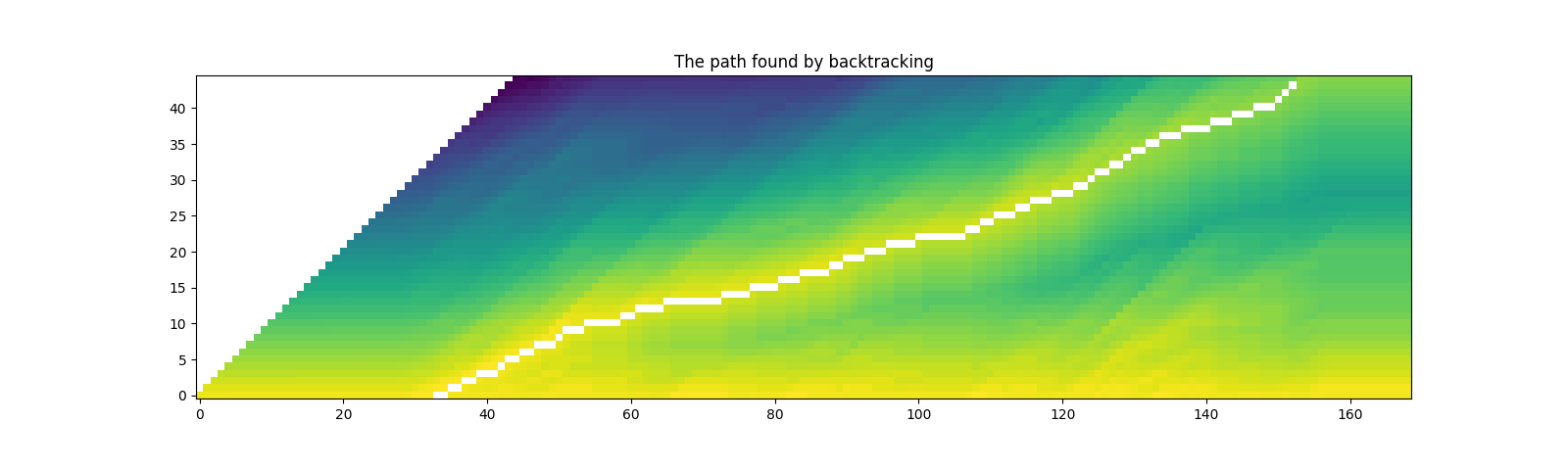
看起来不错。现在这条路径包含相同标签的重复项,因此让我们将它们合并,使其更接近原始转录稿。
在合并多个路径点时,我们直接对合并后的片段取平均概率。
# Merge the labels
@dataclass
class Segment:
  label: str
  start: int
  end: int
  score: float

  def __repr__(self):
    return f"{self.label}\t({self.score:4.2f}): [{self.start:5d}, {self.end:5d})"

  @property
  def length(self):
    return self.end - self.start

def merge_repeats(path):
  i1, i2 = 0, 0
  segments = []
  while i1 < len(path):
    while i2 < len(path) and path[i1].token_index == path[i2].token_index:
      i2 += 1
    score = sum(path[k].score for k in range(i1, i2)) / (i2 - i1)
    segments.append(Segment(transcript[path[i1].token_index], path[i1].time_index, path[i2-1].time_index + 1, score))
    i1 = i2
  return segments

segments = merge_repeats(path)
for seg in segments:
  print(seg)
Out:
I       (0.78): [   30,    34)
|       (0.80): [   34,    36)
H       (1.00): [   36,    38)
A       (0.99): [   38,    40)
D       (0.62): [   40,    43)
|       (1.00): [   43,    44)
T       (0.55): [   44,    46)
H       (1.00): [   46,    48)
A       (0.37): [   48,    51)
T       (0.00): [   51,    52)
|       (1.00): [   52,    55)
C       (0.97): [   55,    60)
U       (1.00): [   60,    62)
R       (0.75): [   62,    66)
I       (0.88): [   66,    74)
O       (0.99): [   74,    78)
S       (1.00): [   78,    82)
I       (0.89): [   82,    85)
T       (0.78): [   85,    89)
Y       (0.70): [   89,    91)
|       (0.66): [   91,    94)
B       (1.00): [   94,    97)
E       (1.00): [   97,   101)
S       (1.00): [  101,   108)
I       (1.00): [  108,   110)
D       (0.93): [  110,   112)
E       (0.66): [  112,   115)
|       (1.00): [  115,   117)
M       (0.67): [  117,   120)
E       (0.67): [  120,   123)
|       (0.50): [  123,   125)
A       (0.98): [  125,   126)
T       (0.50): [  126,   128)
|       (0.51): [  128,   130)
T       (1.00): [  130,   131)
H       (1.00): [  131,   133)
I       (0.75): [  133,   135)
S       (0.36): [  135,   138)
|       (0.50): [  138,   142)
M       (1.00): [  142,   145)
O       (1.00): [  145,   148)
M       (1.00): [  148,   151)
E       (1.00): [  151,   152)
N       (1.00): [  152,   153)
T       (0.68): [  153,   154)
可视化
def plot_trellis_with_segments(trellis, segments, transcript):
  # To plot trellis with path, we take advantage of 'nan' value
  trellis_with_path = trellis.clone()
  for i, seg in enumerate(segments):
    if seg.label != '|':
      trellis_with_path[seg.start+1:seg.end+1, i+1] = float('nan')

  fig, [ax1, ax2] = plt.subplots(2, 1, figsize=(16, 9.5))
  ax1.set_title("Path, label and probability for each label")
  ax1.imshow(trellis_with_path.T, origin='lower')
  ax1.set_xticks([])

  for i, seg in enumerate(segments):
    if seg.label != '|':
      ax1.annotate(seg.label, (seg.start + .7, i + 0.3), weight='bold')
      ax1.annotate(f'{seg.score:.2f}', (seg.start - .3, i + 4.3))

  ax2.set_title("Label probability with and without repetation")
  xs, hs, ws = [], [], []
  for seg in segments:
    if seg.label != '|':
      xs.append((seg.end + seg.start) / 2 + .4)
      hs.append(seg.score)
      ws.append(seg.end - seg.start)
      ax2.annotate(seg.label, (seg.start + .8, -0.07), weight='bold')
  ax2.bar(xs, hs, width=ws, color='gray', alpha=0.5, edgecolor='black')

  xs, hs = [], []
  for p in path:
    label = transcript[p.token_index]
    if label != '|':
      xs.append(p.time_index + 1)
      hs.append(p.score)

  ax2.bar(xs, hs, width=0.5, alpha=0.5)
  ax2.axhline(0, color='black')
  ax2.set_xlim(ax1.get_xlim())
  ax2.set_ylim(-0.1, 1.1)

plot_trellis_with_segments(trellis, segments, transcript)
plt.tight_layout()
plt.show()
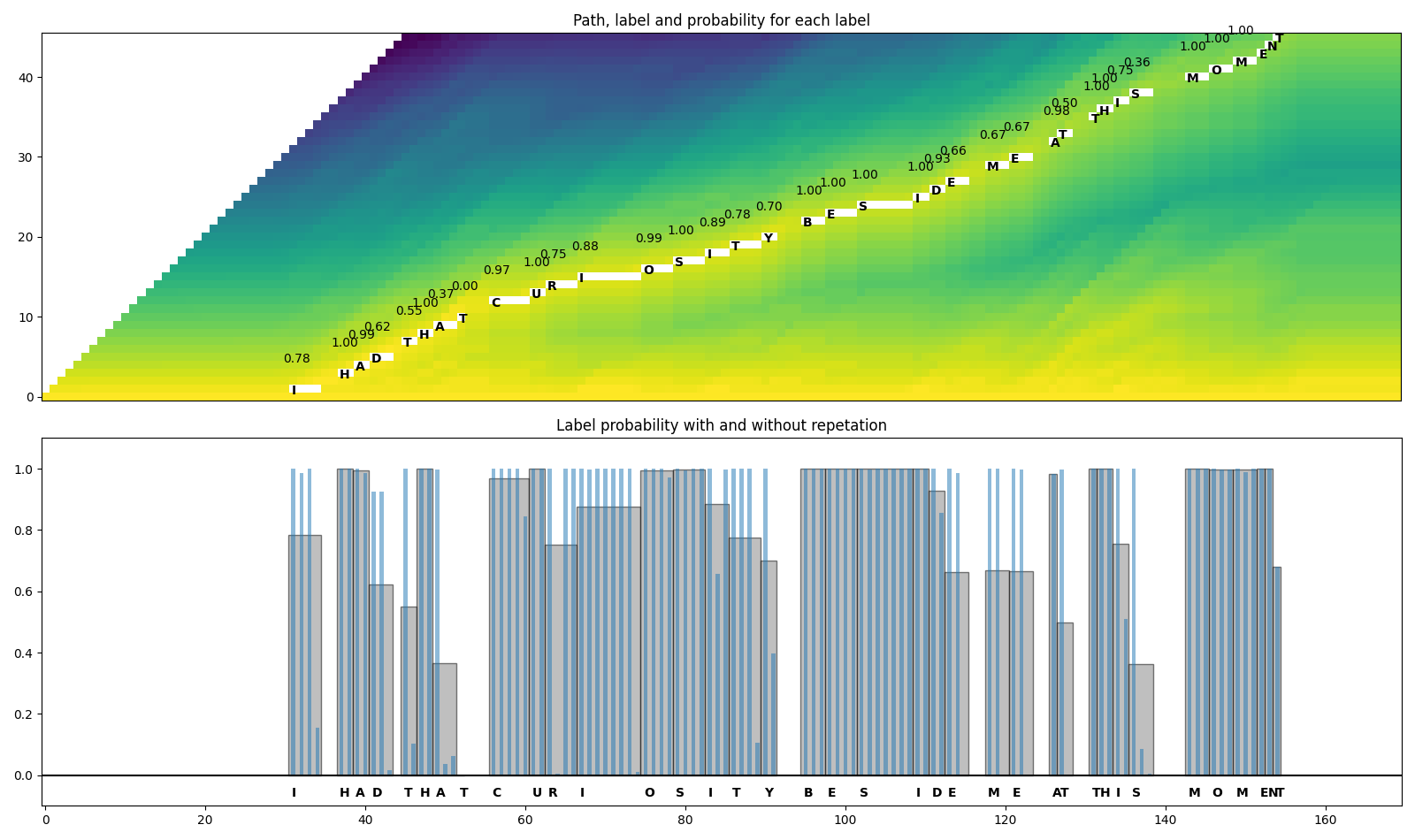
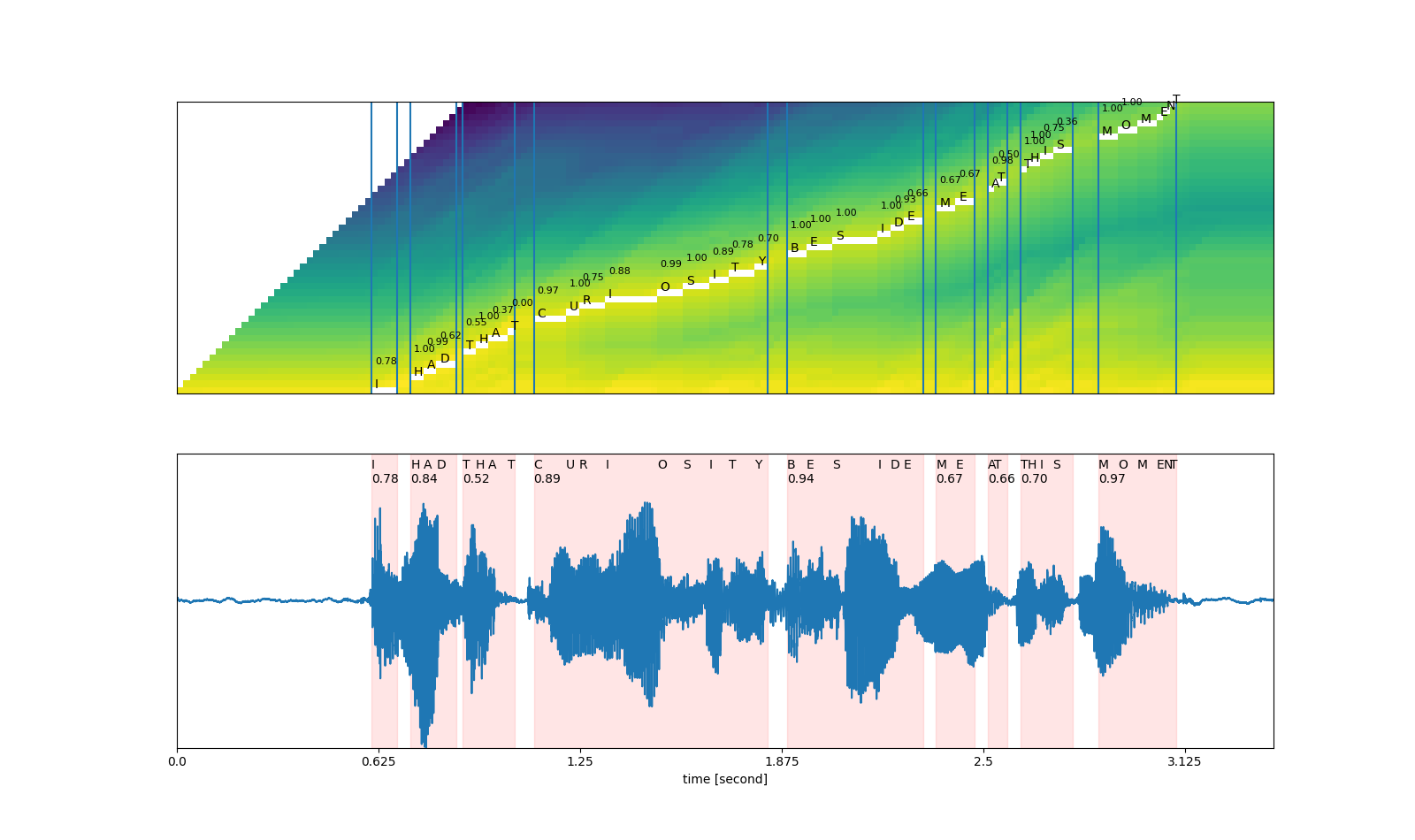
看起来不错。现在让我们合并单词。Wav2Vec2 模型使用 '|'
作为词边界,因此我们在每次出现
'|'之前合并片段。
最后,我们将原始音频分割为分段音频,并聆听这些片段以验证分割是否正确。
# Merge words
def merge_words(segments, separator='|'):
  words = []
  i1, i2 = 0, 0
  while i1 < len(segments):
    if i2 >= len(segments) or segments[i2].label == separator:
      if i1 != i2:
        segs = segments[i1:i2]
        word = ''.join([seg.label for seg in segs])
        score = sum(seg.score * seg.length for seg in segs) / sum(seg.length for seg in segs)
        words.append(Segment(word, segments[i1].start, segments[i2-1].end, score))
      i1 = i2 + 1
      i2 = i1
    else:
      i2 += 1
  return words

word_segments = merge_words(segments)
for word in word_segments:
  print(word)
Out:
I       (0.78): [   30,    34)
HAD     (0.84): [   36,    43)
THAT    (0.52): [   44,    52)
CURIOSITY       (0.89): [   55,    91)
BESIDE  (0.94): [   94,   115)
ME      (0.67): [  117,   123)
AT      (0.66): [  125,   128)
THIS    (0.70): [  130,   138)
MOMENT  (0.97): [  142,   154)
可视化
def plot_alignments(trellis, segments, word_segments, waveform):
  trellis_with_path = trellis.clone()
  for i, seg in enumerate(segments):
    if seg.label != '|':
      trellis_with_path[seg.start+1:seg.end+1, i+1] = float('nan')

  fig, [ax1, ax2] = plt.subplots(2, 1, figsize=(16, 9.5))

  ax1.imshow(trellis_with_path[1:, 1:].T, origin='lower')
  ax1.set_xticks([])
  ax1.set_yticks([])

  for word in word_segments:
    ax1.axvline(word.start - 0.5)
    ax1.axvline(word.end - 0.5)

  for i, seg in enumerate(segments):
    if seg.label != '|':
      ax1.annotate(seg.label, (seg.start, i + 0.3))
      ax1.annotate(f'{seg.score:.2f}', (seg.start , i + 4), fontsize=8)

  # The original waveform
  ratio = waveform.size(0) / (trellis.size(0) - 1)
  ax2.plot(waveform)
  for word in word_segments:
    x0 = ratio * word.start
    x1 = ratio * word.end
    ax2.axvspan(x0, x1, alpha=0.1, color='red')
    ax2.annotate(f'{word.score:.2f}', (x0, 0.8))

  for seg in segments:
    if seg.label != '|':
      ax2.annotate(seg.label, (seg.start * ratio, 0.9))
  xticks = ax2.get_xticks()
  plt.xticks(xticks, xticks / bundle.sample_rate)
  ax2.set_xlabel('time [second]')
  ax2.set_yticks([])
  ax2.set_ylim(-1.0, 1.0)
  ax2.set_xlim(0, waveform.size(-1))

plot_alignments(trellis, segments, word_segments, waveform[0],)
plt.show()

# A trick to embed the resulting audio to the generated file.
# `IPython.display.Audio` has to be the last call in a cell,
# and there should be only one call par cell.
def display_segment(i):
  ratio = waveform.size(1) / (trellis.size(0) - 1)
  word = word_segments[i]
  x0 = int(ratio * word.start)
  x1 = int(ratio * word.end)
  filename = f"_assets/{i}_{word.label}.wav"
  torchaudio.save(filename, waveform[:, x0:x1], bundle.sample_rate)
  print(f"{word.label} ({word.score:.2f}): {x0 / bundle.sample_rate:.3f} - {x1 / bundle.sample_rate:.3f} sec")
  return IPython.display.Audio(filename)
# Generate the audio for each segment
print(transcript)
IPython.display.Audio(SPEECH_FILE)
Out:
I|HAD|THAT|CURIOSITY|BESIDE|ME|AT|THIS|MOMENT
display_segment(0)
Out:
I (0.78): 0.604 - 0.684 sec
display_segment(1)
Out:
HAD (0.84): 0.724 - 0.865 sec
display_segment(2)
Out:
THAT (0.52): 0.885 - 1.046 sec
display_segment(3)
Out:
CURIOSITY (0.89): 1.107 - 1.831 sec
display_segment(4)
Out:
BESIDE (0.94): 1.891 - 2.314 sec
display_segment(5)
Out:
ME (0.67): 2.354 - 2.474 sec
display_segment(6)
Out:
AT (0.66): 2.515 - 2.575 sec
display_segment(7)
Out:
THIS (0.70): 2.615 - 2.776 sec
display_segment(8)
Out:
MOMENT (0.97): 2.857 - 3.098 sec