后端与委托
受众:供应商、后端委托开发人员,他们有兴趣将自己编译器和硬件集成到 ExecuTorch 中
后端委托是后端处理和执行 PyTorch 程序的入口点,以便利用专用后端和硬件的性能和效率优势,同时仍为 PyTorch 用户提供接近 PyTorch 运行时的体验。
后端接口:概述
从高层次来看,后端的入口点由两个组件定义:
一个表示程序的IR: Edge Dialect (通过
to_edgeAPI 生成)几个后端需要实现的接口:
提前编译(AOT)
程序预处理(例如提前编译、转换、优化等)。
运行时
程序初始化(例如运行时编译)。
程序执行。
(可选)程序销毁(例如释放后端拥有的资源)。
一个委托后端实现由以下部分组成:
一种提前预处理接口
运行时初始化和执行接口
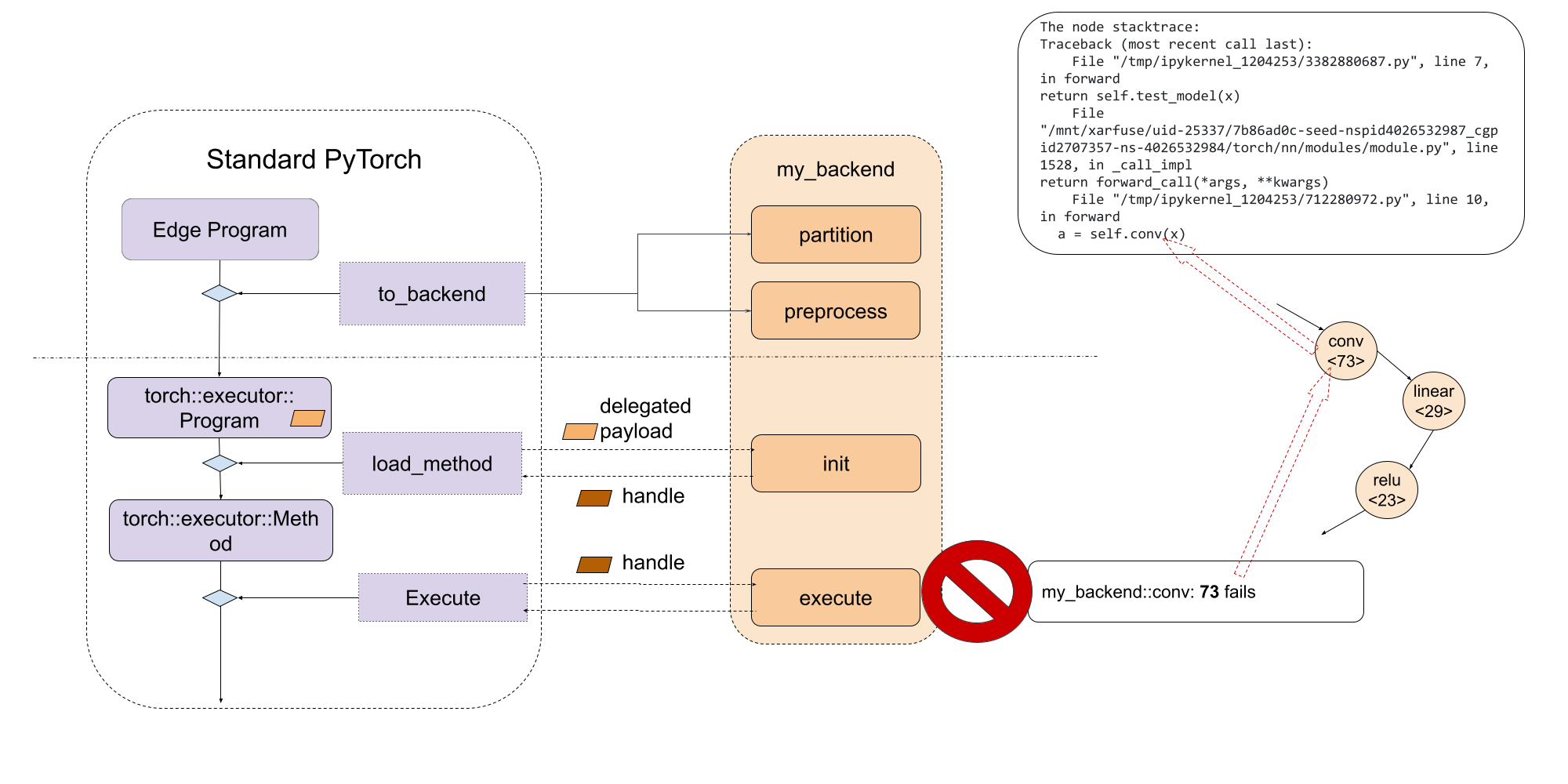
该图看起来如下
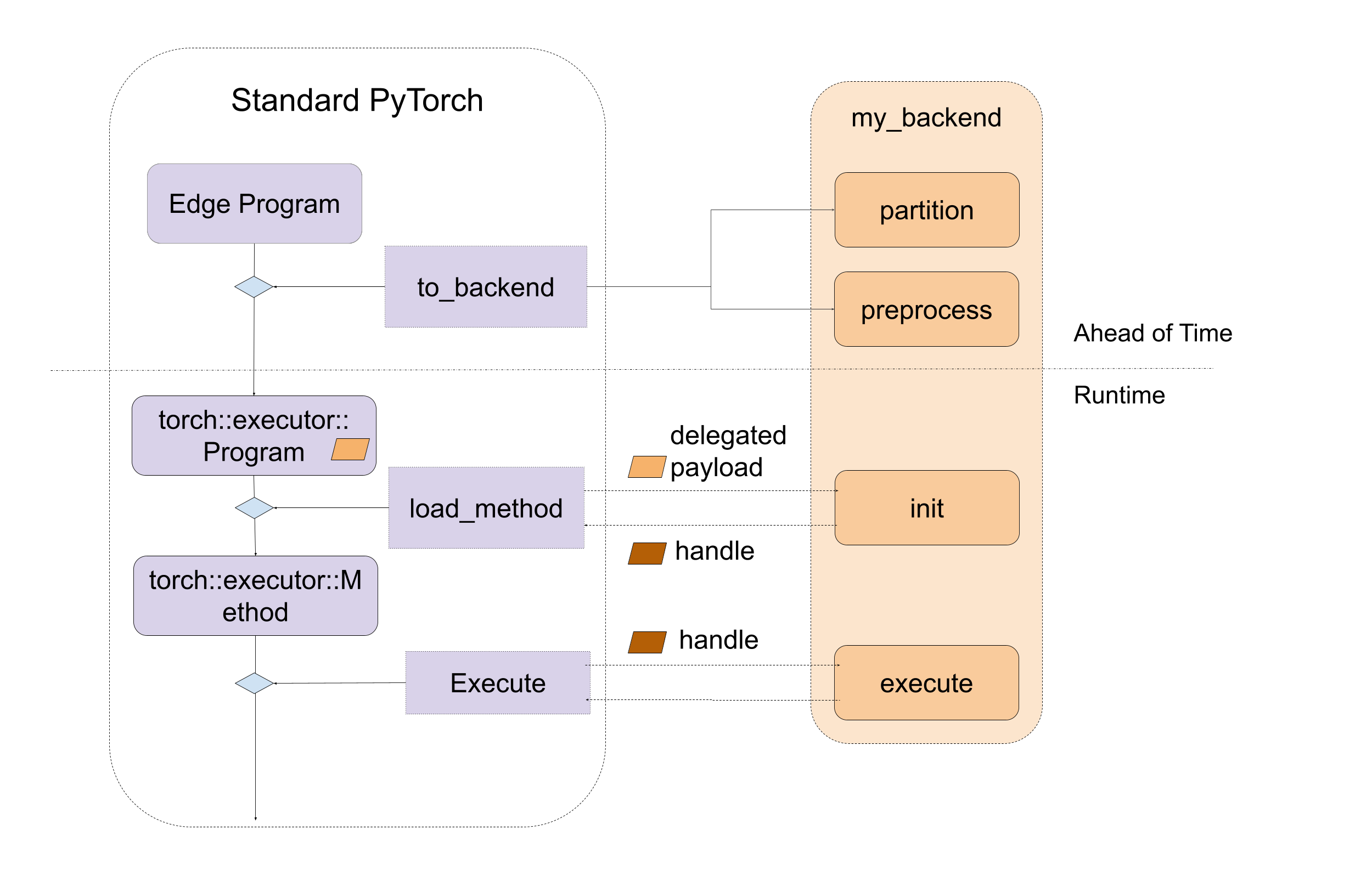
图1. 后端接口的高级入口点,包括编译时和运行时两种。
后端接口:提前编译预处理
主要有两个提前编译的入口点供后端实现:partition 和 preprocess。
partitioner 是后端实现的算法,用于标记要下放到后端的节点。 to_backend API 会应用分区算法,并将由连接的标记节点组成的每个子图下放到目标后端。每个子图
将被发送到由后端提供的 preprocess 部分进行编译,生成二进制 blob。
在分片过程中,exported_program 不允许修改程序,并且应该对每个节点应用标签。PartitionResult 包括带有标签的导出程序和分片标签字典,供 to_backend 查找标签并
链接到 backend_id 和 compile_spec
def partition(
    exported_program: ExportedProgram,
) -> PartitionResult:
在预处理过程中,后端会接收到一个边疆方言程序,
一个指定编译所需值的编译规范列表,并预期返回一个编译后的二进制文件,或包含所需程序的二进制文件以在后端运行。在序列化过程中,
编译后的二进制文件将作为 .pte 文件的一部分进行序列化,并直接加载到设备上。此过程的API为:
def preprocess(
    edge_program: ExportedProgram,
    compile_specs: List[CompileSpec],
) -> PreprocessResult:
预处理函数的演示已实现
这里。
演示循环遍历图模块中的节点 edge_program 并将 add、mul 和 sin 指令序列化为字符串,该字符串稍后在运行时被解析和执行。
该图看起来如下
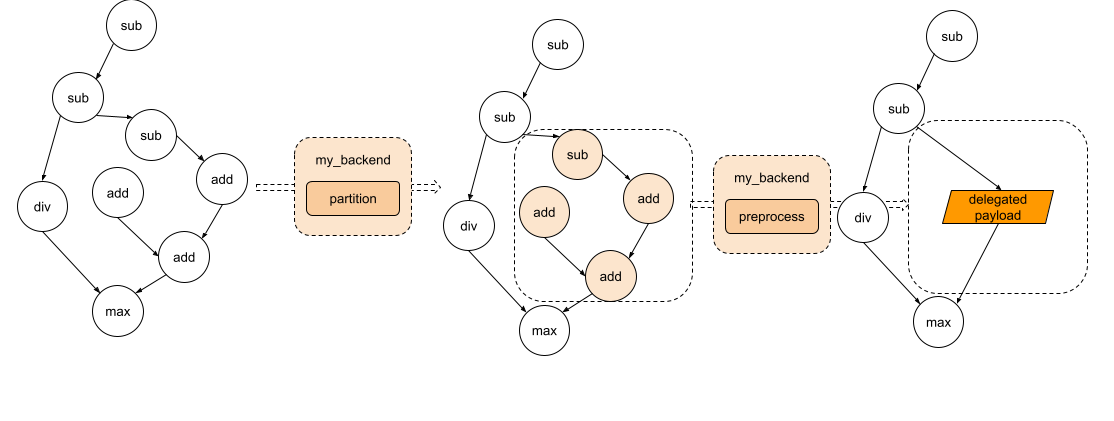
图2. 该图经过分区,每个子图将被发送到预处理部分。
后端接口:运行时初始化和执行
在运行时,来自 preprocess 函数的编译单元将被加载并直接传递给后端的自定义 init 函数。此函数负责进一步处理编译单元,以及执行任何后端初始化。然后,后端的自定义 execute 函数将被调用以执行由 init 生成的句柄。最后,如果某些后端需要销毁,则后端可以实现一个 destroy 函数,该函数将在程序超出其生命周期时被调用。
// Runtime check
ET_NODISCARD bool is_available();

// Runtime initialization
ET_NODISCARD virtual Result<DelegateHandle*> init(
    BackendInitContext& context,
    FreeableBuffer* processed,
    ArrayRef<CompileSpec> compile_specs);

// Runtime execution
ET_NODISCARD virtual Error execute(
    BackendExecutionContext& context,
    DelegateHandle* handle,
    EValue** args);

// [optional] Runtime destroy. Destroy the resource held by the backend
virtual void destroy(ET_UNUSED DelegateHandle* handle);
该图看起来如下
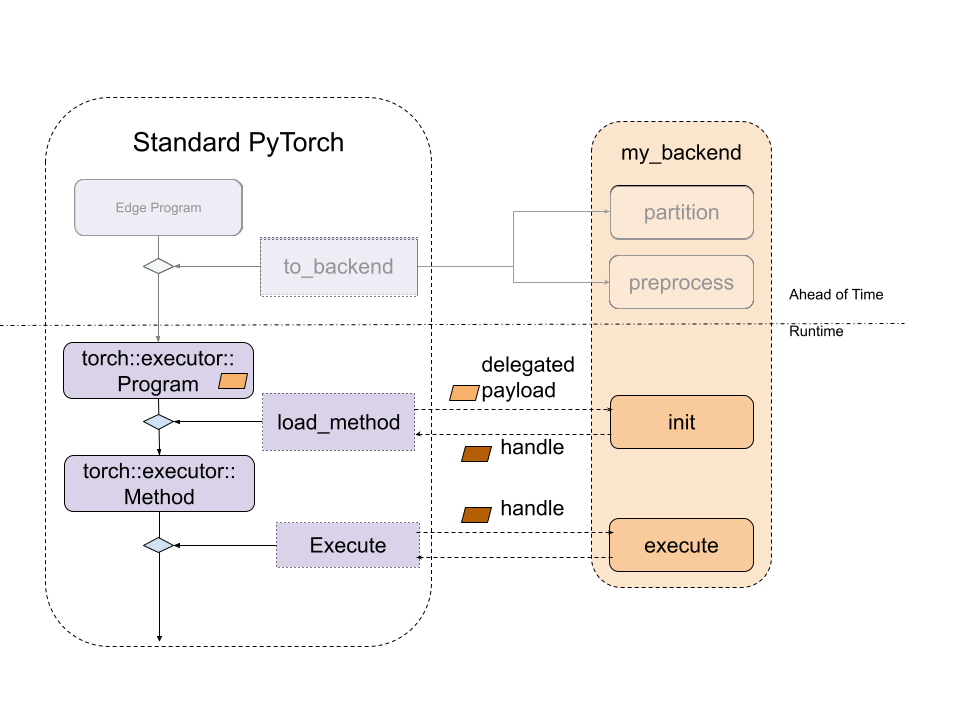
图3. 标准ExecuTorch运行时与后端入口点之间的关系。
为了使后端可用与ExecuTorch运行时,它必须通过 register_backend API 注册:
ET_NODISCARD Error register_backend(const Backend& backend);
静态注册,即在库初始化或加载时注册后端,可以按照以下方式进行:
namespace {
auto cls = BackendWithCompiler();
Backend backend{"BackendWithCompilerDemo", &cls};
static auto success_with_compiler = register_backend(backend);
} // namespace
开发者工具集成:可调试性
提供一致的调试体验,无论是针对运行时故障还是性能分析,都非常重要。ExecuTorch 为此使用了原生开发者工具,通过调试句柄将程序指令与原始 PyTorch 代码关联起来。你可以点击 这里 了解更多。
委托程序或子图对ExecuTorch运行时是不透明的,它们会显示为一个特殊的 call_delegate 指令,该指令要求相应的后端处理子图或程序的执行。由于后端委托的不透明性,原生开发者工具无法查看委托程序。因此,与非委托版本相比,委托执行的调试、功能或性能体验会受到显著影响。
为了给用户提供一致的调试体验,无论模型是否使用委托,Developer Tools 都提供了一个界面来关联委托的(子)图与原始的(子)图。Developer Tools 通过调试句柄映射实现这一点,这允许委托生成可以与委托消耗的原始(子)图关联的内部句柄。然后在运行时,后端开发人员可以使用内部句柄报告错误或性能分析信息,这些信息将通过调试句柄映射到原始的(子)图。更多信息,请参阅 委托调试。
通过利用调试标识符,后端开发人员可以将调试信息作为委托 blob 的一部分进行嵌入
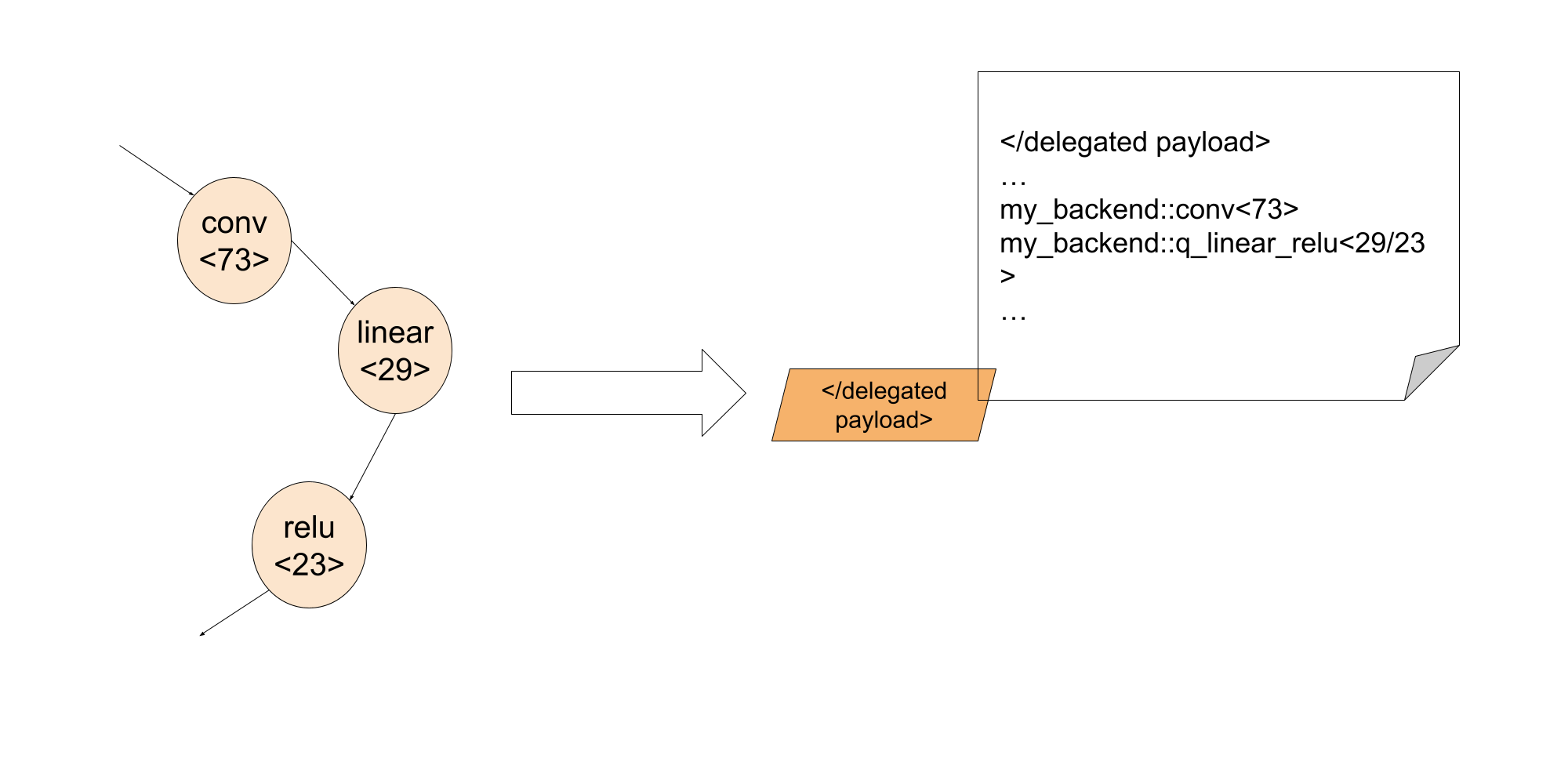
这样,在执行阶段,通过调试标识符,后端开发人员可以将委托内部失败的指令关联回 Python 代码中的确切行。
常见问题
如何在 backend.preprocess 中获取数据?
正在预处理的图模块是一个提升后的图,这意味着静态数据如权重和偏置是作为输入提供给图的。然而,我们可以通过导出的程序提前访问这些权重和偏置。要从给定的节点访问这些参数,我们可以使用 get_params
提供的函数 torch/_export/utils.py
2. 我们如何将数据(如权重/偏置)嵌入到后端?
后端通常会有一些方法来优化常量数据。在这种情况下,我们需要标记那些同时也是分区器中状态的占位符节点,并在 backend.preprocess 中按照第一个问题中的描述来获取权重。
3. 我们如何在 Python 中使用特定后端运行降低后的模块?
我们还没有添加支持,但这是计划中的!
4. 我们应该期望在边方言程序中看到 get_attr 个节点吗?
get_attr 节点只会显示在用于控制流或委托的子模块中。它不会保存任何数据。
5. 我们可以委托给多个后端吗?
是的!有两种方法可以做到这一点:
选项 1: 为不同的后端多次运行 to_backend
如果我们有两个后端,backend_1 和 backend_2,并且它们各自有自己的分区器:backend_1_parititioner 和 backend_2_partitioner,我们可以这样运行:
# Will first lower nodes to backend_1 depending on the backend_1_parititioner depending on partitioner algorithm
exported_program_backend_1 = to_backend(exported_program, backend_1_parititioner())
# For the rest of nodes, they will be lowered to backend_2 depending on backend_2_parititioner
exported_program_backend_1_and_2 = to_backend(exported_program_backend_1, backend_2_parititioner())
一个更具体的例子可以在这里找到 这里。 在这个例子中, qnnpack 是其中一个后端,xnnpack 是另一个后端。我们还没有开源 这两个后端委托,因此这个例子不能直接运行。它可以 用作参考,以了解如何实现。
这个选项很容易尝试,因为通常所有后端都会实现自己的分区器。然而,如果我们改变 to_backend 调用的顺序,可能会得到不同的结果。如果我们希望更好地控制节点,例如它们应该去哪个后端,选项 2 更为合适。
选项 2:拥有一个分区器,用于针对不同的后端进行分区
另一种选择是创建一个自定义的分区器,例如分区器
backend_1_2_partitioner,并在分区器逻辑中,
class Backend_1_2_Partitioner(Partitioner):
    """
    Partitions all add/mul nodes regardless of order for Backend2
    """

    def __init__(self) -> None:
        self.delegation_spec_1 = DelegationSpec("Backend1", [])
        self.delegation_spec_2 = DelegationSpec("Backend2", [])
        self.partition_tags = {}

    def partition(
        self, exported_program: ExportedProgram
    ) -> ExportedProgram:

        # Tag all nodes in the first partiton to backend 1
        node_to_backend_1 = ... # some logic to select the nodes from the graph
        delegation_tag = f"backend2_tag{partitioner_1.id}"
        node.meta["delegation_tag"] = delegation_tag
        self.partition_tags[delegation_tag] = self.delegation_spec_1

        # Tag all nodes in the first partiton to backend 2
        node_to_backend_2 = ... # some logic to select the nodes from the graph
        delegation_tag = f"backend2_tag{partitioner_2.id}"
        node.meta["delegation_tag"] = delegation_tag
        self.partition_tags[delegation_tag] = self.delegation_spec_2
        return exported_program
6. 有没有一种简单的方法来编写分区器?
我们提供了一些辅助分区器 这里,以便轻松找到 分解操作符的节点。
7. 我们如何将节点链接回源代码? 我们提供一个辅助函数
from executorch.exir.print_program import inspect_node

print(inspect_node(graph, node))
它还会在图中突出显示该节点,并指向源代码,示例输出如下:
_param_constant1 error_msg:  Here is the node in the graph module:
graph():
    %arg0_1 : [num_users=1] = placeholder[target=arg0_1]
    %_param_constant0 : [num_users=1] = get_attr[target=_param_constant0]
--> %_param_constant1 : [num_users=1] = get_attr[target=_param_constant1]
    %aten_convolution_default : [num_users=2] = call_function[target=executorch.exir.dialects.edge._ops.aten.convolution.default](args = (%arg0_1, %_param_constant0, %_param_constant1, [1, 1], [0, 0], [1, 1], False, [0, 0], 1), kwargs = {})
    %_param_constant2 : [num_users=1] = get_attr[target=_param_constant2]
    %_param_constant3 : [num_users=1] = get_attr[target=_param_constant3]
    %aten_convolution_default_1 : [num_users=1] = call_function[target=executorch.exir.dialects.edge._ops.aten.convolution.default](args = (%aten_convolution_default, %_param_constant2, %_param_constant3, [1, 1], [0, 0], [1, 1], False, [0, 0], 1), kwargs = {})
    %aten_add_tensor : [num_users=1] = call_function[target=executorch.exir.dialects.edge._ops.aten.add.Tensor](args = (%aten_convolution_default, %aten_convolution_default_1), kwargs = {})
    %_param_constant4 : [num_users=1] = get_attr[target=_param_constant4]
    %_param_constant5 : [num_users=1] = get_attr[target=_param_constant5]
    %aten_convolution_default_2 : [num_users=1] = call_function[target=executorch.exir.dialects.edge._ops.aten.convolution.default](args = (%aten_add_tensor, %_param_constant4, %_param_constant5, [1, 1], [0, 0], [1, 1], False, [0, 0], 1), kwargs = {})
    %aten_gelu_default : [num_users=1] = call_function[target=executorch.exir.dialects.edge._ops.aten.gelu.default](args = (%aten_convolution_default_2,), kwargs = {})
    return [aten_gelu_default]
This node _param_constant1 has metadata of:
The node stacktrace:
Traceback (most recent call last):
    File "/tmp/ipykernel_1204253/3382880687.py", line 7, in forward
return self.test_model(x)
    File "/mnt/xarfuse/uid-25337/7b86ad0c-seed-nspid4026532987_cgpid2707357-ns-4026532984/torch/nn/modules/module.py", line 1528, in _call_impl
return forward_call(*args, **kwargs)
    File "/tmp/ipykernel_1204253/712280972.py", line 10, in forward
a = self.conv1(x)