Inspector APIs
概览
检查器API为分析ETRecord和ETDump的内容提供了便捷的接口,帮助开发者深入了解模型架构和性能统计数据。它基于EventBlock类数据结构构建,该结构组织了一组事件,以便于访问剖析事件的详细信息。
用户可以通过多种方式与 Inspector API 进行交互:
通过使用 public methods 提供的公共方法,这些方法由
Inspector类提供。通过访问 公共属性,可以访问
Inspector、EventBlock和Event类。通过使用 命令行界面(CLI) 工具进行基本功能操作。
请参考端到端用例文档,了解如何在实际场景中使用这些内容。
检查器方法
构造函数
- executorch.devtools.Inspector.__init__(self, etdump_path=None, etdump_data=None, etrecord=None, source_time_scale=TimeScale.NS, target_time_scale=TimeScale.MS, debug_buffer_path=None, delegate_metadata_parser=None, delegate_time_scale_converter=None, enable_module_hierarchy=False)
使用来自提供的 ETDump 路径或二进制文件的数据填充底层的EventBlocks,初始化一个Inspector实例,以及可选的 ETRecord 路径。
- Parameters
etdump_path – ETDump 文件的路径。必须提供此参数或 etdump_data 其中之一。
etdump_data – ETDump 二进制文件。必须提供此参数或 etdump_path。
etrecord – 可选的 ETRecord 对象或 ETRecord 文件的路径。
source_time_scale – 从运行时检索的性能数据的时间尺度。运行时中的默认时间钩子实现返回 NS。
target_time_scale – 用户希望将其性能数据转换到的目标时间尺度。默认为 MS。
debug_buffer_path – 调试缓冲区文件路径,包含 ETDump 用于中间输出和程序输出的调试数据。
delegate_metadata_parser – 用于从分析事件中解析代理元数据的可选函数。函数的预期签名为: (delegate_metadata_list: List[bytes]) -> Union[List[str], Dict[str, Any]]
delegate_time_scale_converter – 用于转换代理分析数据时间尺度的可选函数。如果未提供,则使用 target_time_scale/source_time_scale 的转换比率。
enable_module_hierarchy – 在运算符图中启用子模块。默认为 False。
- Returns
请提供需要翻译的单词列表。
示例用法:
from executorch.devtools import Inspector

inspector = Inspector(etdump_path="/path/to/etdump.etdp", etrecord="/path/to/etrecord.bin")
to_dataframe
- executorch.devtools.Inspector.to_dataframe(self, include_units=True, include_delegate_debug_data=False)
- Parameters
include_units – 标题是否应包含单位(默认为 true)
include_delegate_debug_data – 是否包含委托调试元数据(默认为 false)
- Returns
返回检查器中每个事件块的事件的 pandas 数据框,其中每一行代表一个事件。
print_data_tabular
- executorch.devtools.Inspector.print_data_tabular(self, file=<sphinx_gallery.gen_rst._LoggingTee object>, include_units=True, include_delegate_debug_data=False)
以结构化的表格形式显示底层 EventBlocks,其中每一行代表一个 Event。
- Parameters
file – 要打印到的 IO 流。默认为 stdout。 如果此代码位于 IPython 环境(如 Jupyter notebook)中,则不使用该参数。
include_units – 标题是否应包含单位(默认为 true)
include_delegate_debug_data – 是否包含委托调试元数据(默认为 false)
- Returns
请提供需要翻译的单词列表。
示例用法:
inspector.print_data_tabular()
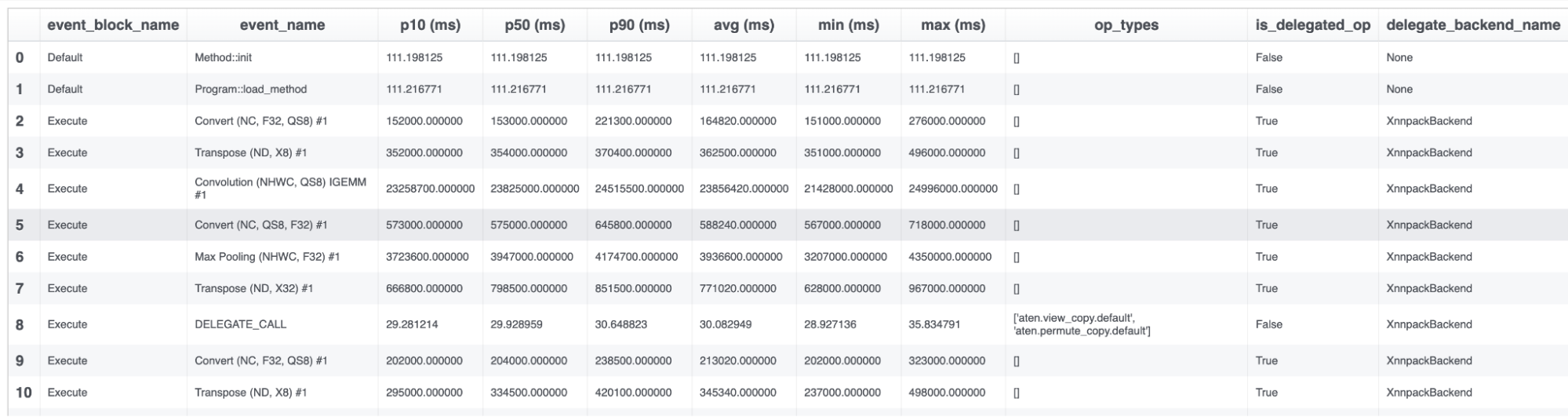
请注意,委托分析事件的单位是“周期”。我们正在努力在未来提供设置不同单位的方法。
find_total_for_module
- executorch.devtools.Inspector.find_total_for_module(self, module_name)
返回指定模块内所有算子的总平均计算时间。
- Parameters
module_name – 要聚合的模块名称。
- Returns
模块“{module_name}"内所有算子的平均计算时间(秒)之和。
示例用法:
print(inspector.find_total_for_module("L__self___conv_layer"))
0.002
get_exported_program
- executorch.devtools.Inspector.get_exported_program(self, graph=None)
ETRecord 的辅助访问器,默认返回边缘方言程序。
- Parameters
graph – 要访问的图的可选名称。如果为 None,则返回 Edge Dialect 程序。
- Returns
“图”的 ExportedProgram 对象。
示例用法:
print(inspector.get_exported_program())
ExportedProgram:
    class GraphModule(torch.nn.Module):
        def forward(self, arg0_1: f32[4, 3, 64, 64]):
            # No stacktrace found for following nodes
            _param_constant0 = self._param_constant0
            _param_constant1 = self._param_constant1

            ### ... Omit part of the program for documentation readability ... ###

Graph signature: ExportGraphSignature(parameters=[], buffers=[], user_inputs=['arg0_1'], user_outputs=['aten_tan_default'], inputs_to_parameters={}, inputs_to_buffers={}, buffers_to_mutate={}, backward_signature=None, assertion_dep_token=None)
Range constraints: {}
Equality constraints: []
检查器属性
EventBlock 类
通过 EventBlock 实例的 event_blocks 属性访问它们,例如:
inspector.event_blocks
- class executorch.devtools.inspector.EventBlock(name, events=<factory>, source_time_scale=TimeScale.NS, target_time_scale=TimeScale.MS, bundled_input_index=None, run_output=None, reference_output=None)[source]
一个EventBlock包含从运行时检索到的与特定性能分析/调试块关联的事件集合。 每个EventBlock代表一种执行模式。例如,模型初始化和加载位于单个EventBlock中。 如果存在控制流,每个分支将由单独的EventBlock表示。
- Parameters
name – 分析/调试块的名称。
events – 与性能分析/调试块关联的 Event 列表。
bundled_input_idx – 此 EventBlock 对应的捆绑输入索引。
run_output – 从封装的事件中提取的运行输出
Event 类
通过 Event 属性访问 events 实例的
EventBlock 实例。
- class executorch.devtools.inspector.Event(name, perf_data=None, op_types=<factory>, delegate_debug_identifier=None, debug_handles=None, stack_traces=<factory>, module_hierarchy=<factory>, is_delegated_op=None, delegate_backend_name=None, _delegate_debug_metadatas=<factory>, debug_data=<factory>, _instruction_id=None, _delegate_metadata_parser=None, _delegate_time_scale_converter=None)[source]
事件对应于一个运算符实例,其性能数据从运行时检索,其他元数据来自ETRecord。
- Parameters
name – 分析配置文件的Event名称,若无分析事件则为空。
perf_data – 与从运行时检索到的事件关联的性能数据(可用属性:p10、p50、p90、avg、min 和 max)。
op_type – 与事件对应的操作类型列表。
delegate_debug_identifier – 与指令 ID 结合使用的补充标识符。
debug_handles – 与此事件相关的模型图中的调试句柄。
stack_trace – 一个字典,将每个关联操作的名称映射到其堆栈跟踪。
module_hierarchy – 一个字典,将每个关联操作的名称映射到其模块层级。
is_delegated_op – 事件是否已委托。
delegate_backend_name – 此事件被委托给的后端名称。
_delegate_debug_metadatas – 一个包含原始委托调试元数据的字符串列表,每个配置文件事件对应一个。 如果提供了解析器,则可用 Event.delegate_debug_metadatas 获取已解析的数据 可通过 Event.raw_delegate_debug_metadatas 获取原始数据
debug_data – 包含收集的中间数据的列表。
_instruction_id – 符号化指令标识符
_delegate_metadata_parser – _delegate_debug_metadatas 的可选解析器
示例用法:
for event_block in inspector.event_blocks:
    for event in event_block.events:
        if event.name == "Method::execute":
            print(event.perf_data.raw)
[175.748, 78.678, 70.429, 122.006, 97.495, 67.603, 70.2, 90.139, 66.344, 64.575, 134.135, 93.85, 74.593, 83.929, 75.859, 73.909, 66.461, 72.102, 84.142, 77.774, 70.038, 80.246, 59.134, 68.496, 67.496, 100.491, 81.162, 74.53, 70.709, 77.112, 59.775, 79.674, 67.54, 79.52, 66.753, 70.425, 71.703, 81.373, 72.306, 72.404, 94.497, 77.588, 79.835, 68.597, 71.237, 88.528, 71.884, 74.047, 81.513, 76.116]
CLI
在终端中执行以下命令以显示数据表。此命令生成的表格输出与调用前面提到的 print_data_tabular 相同:
python3 -m devtools.inspector.inspector_cli --etdump_path <path_to_etdump> --etrecord_path <path_to_etrecord>
请注意,etrecord_path 参数是可选的。
我们计划在未来扩展 CLI 的功能。