(beta) BERT上的动态量化
创建时间:2019年12月06日 | 最后更新时间:2024年08月29日 | 最后验证时间:2024年11月05日
提示
要充分利用本教程,我们建议使用此Colab 版本。这将允许您对下面呈现的信息进行实验。
作者: 黄建宇
审阅人: Raghuraman Krishnamoorthi
编辑者: 林嘉诚
介绍
在本教程中,我们将对BERT模型应用动态量化,紧密跟随来自HuggingFace Transformers示例的BERT模型。 通过这个逐步的过程,我们希望展示如何将像BERT这样的知名先进模型转换为动态量化模型。
BERT,或来自Transformer的双向嵌入表示,是一种预训练语言表示的新方法,它在许多流行的自然语言处理(NLP)任务中达到了最先进的准确率结果,例如问答、文本分类等。原始论文可以在这里找到 这里。
PyTorch中的动态量化支持将一个浮点模型转换为使用静态int8或float16数据类型的量化模型,用于权重,而激活值则进行动态量化。当权重被量化为int8时,激活值会动态地(按批次)量化为int8。在PyTorch中,我们有torch.quantization.quantize_dynamic API,它将指定的模块替换为动态权重-only量化版本,并输出量化后的模型。
我们展示了在通用语言理解评估基准 (GLUE) 的微软研究释义语料库(MRPC)任务上的准确性和推理性能结果。Microsoft Research Paraphrase Corpus (MRPC) task 是从在线新闻来源自动提取的句子对语料库,其中有人类标注的句子对是否在语义上等价。由于类别不平衡(68% 正例,32% 负例),我们遵循常见做法并报告 F1 分数。 MRPC 是一种常见的语言对分类 NLP 任务,如下所示。
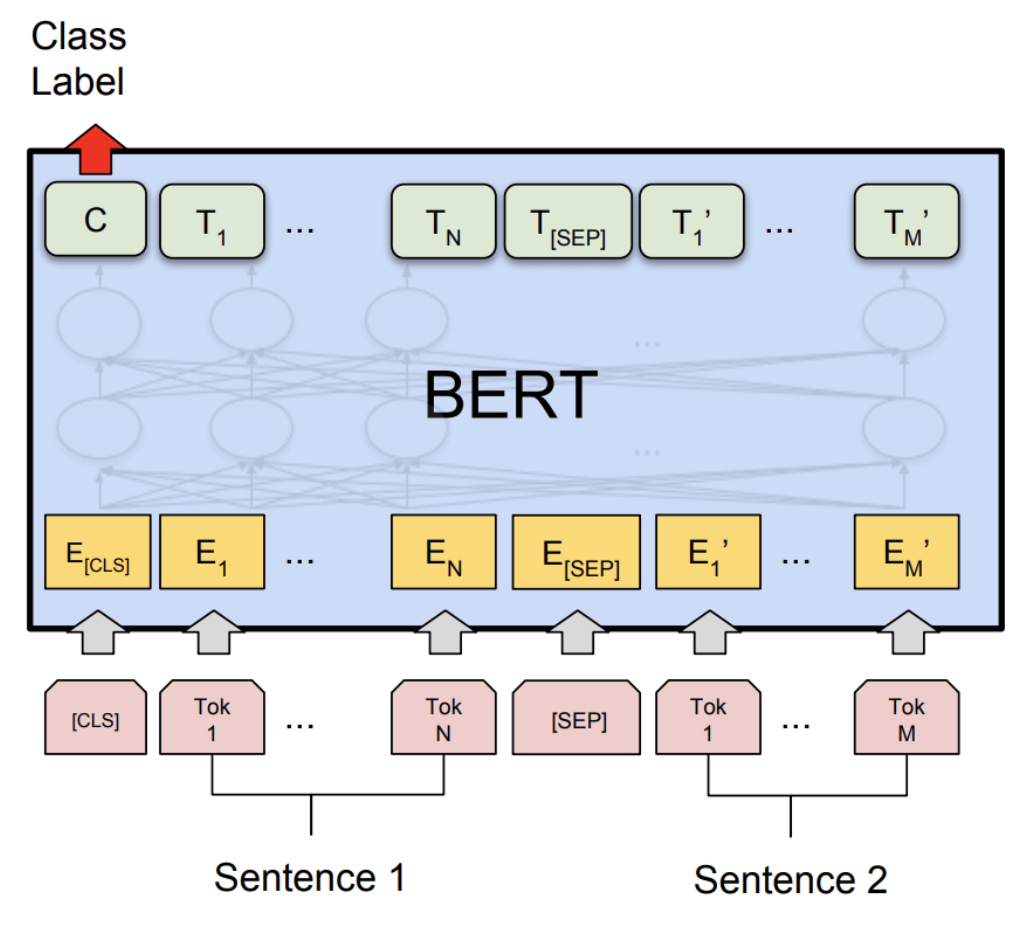
1. 设置
1.1 安装 PyTorch 和 HuggingFace Transformers
要开始本教程,首先请按照PyTorch 这里 和 HuggingFace Github 仓库 这里 的安装说明进行操作。 此外,我们还需要安装 scikit-learn 包,因为我们将重用其内置的F1分数计算辅助函数。
pip install sklearn
pip install transformers==4.29.2
因为我们将会使用PyTorch的测试版部分,所以建议安装最新版本的torch和torchvision。你可以在这里找到最新的本地安装说明。例如,在Mac上安装:
yes y | pip uninstall torch torchvision
yes y | pip install --pre torch -f https://download.pytorch.org/whl/nightly/cu101/torch_nightly.html
1.2 导入必要的模块
在这个步骤中,我们导入教程所需的必要 Python 模块。
import logging
import numpy as np
import os
import random
import sys
import time
import torch

from argparse import Namespace
from torch.utils.data import (DataLoader, RandomSampler, SequentialSampler,
                              TensorDataset)
from tqdm import tqdm
from transformers import (BertConfig, BertForSequenceClassification, BertTokenizer,)
from transformers import glue_compute_metrics as compute_metrics
from transformers import glue_output_modes as output_modes
from transformers import glue_processors as processors
from transformers import glue_convert_examples_to_features as convert_examples_to_features

# Setup logging
logger = logging.getLogger(__name__)
logging.basicConfig(format = '%(asctime)s - %(levelname)s - %(name)s -   %(message)s',
                    datefmt = '%m/%d/%Y %H:%M:%S',
                    level = logging.WARN)

logging.getLogger("transformers.modeling_utils").setLevel(
   logging.WARN)  # Reduce logging

print(torch.__version__)
我们将线程数设置为比较 FP32 和 INT8 性能之间的单线程性能。 在教程的最后,用户可以通过使用正确的并行后端构建 PyTorch 来设置其他线程数。
torch.set_num_threads(1)
print(torch.__config__.parallel_info())
1.3 了解辅助函数
辅助函数已内置在 transformers 库中。我们主要使用以下两个辅助函数:一个用于将文本示例转换为特征向量;另一个用于测量预测结果的 F1 分数。
The glue_convert_examples_to_features function converts the texts into input features:
对输入序列进行分词;
在开头插入 [CLS];
在第一个句子和第二个句子之间插入 [SEP],并在末尾;
生成 token type ids 以指示一个 token 属于第一个序列还是第二个序列。
The glue_compute_metrics function has the compute metrics with the F1 score, which can be interpreted as a weighted average of the precision and recall, where an F1 score reaches its best value at 1 and worst score at 0. The relative contribution of precision and recall to the F1 score are equal.
F1 分数的公式为:
2. 微调BERT模型
BERT 的核心思想是预先训练语言表示,然后在各种任务上以最小的任务相关参数对深层双向表示进行微调,从而取得最先进的结果。在本教程中,我们将专注于使用预训练的 BERT 模型,在 MRPC 任务上对语义等价的句子对进行分类。
为了对预训练的BERT模型(HuggingFace transformers中的bert-base-uncased个模型)进行微调,以完成MRPC任务,您可以按照examples中的命令操作:
export GLUE_DIR=./glue_data
export TASK_NAME=MRPC
export OUT_DIR=./$TASK_NAME/
python ./run_glue.py \
    --model_type bert \
    --model_name_or_path bert-base-uncased \
    --task_name $TASK_NAME \
    --do_train \
    --do_eval \
    --do_lower_case \
    --data_dir $GLUE_DIR/$TASK_NAME \
    --max_seq_length 128 \
    --per_gpu_eval_batch_size=8   \
    --per_gpu_train_batch_size=8   \
    --learning_rate 2e-5 \
    --num_train_epochs 3.0 \
    --save_steps 100000 \
    --output_dir $OUT_DIR
我们为MRPC任务提供了微调后的BERT模型 这里。
为了节省时间,您可以直接将模型文件(约400 MB)下载到本地文件夹 $OUT_DIR 中。
2.1 设置全局配置
在这里,我们设置全局配置,用于评估动态量化前后的微调 BERT 模型。
configs = Namespace()

# The output directory for the fine-tuned model, $OUT_DIR.
configs.output_dir = "./MRPC/"

# The data directory for the MRPC task in the GLUE benchmark, $GLUE_DIR/$TASK_NAME.
configs.data_dir = "./glue_data/MRPC"

# The model name or path for the pre-trained model.
configs.model_name_or_path = "bert-base-uncased"
# The maximum length of an input sequence
configs.max_seq_length = 128

# Prepare GLUE task.
configs.task_name = "MRPC".lower()
configs.processor = processors[configs.task_name]()
configs.output_mode = output_modes[configs.task_name]
configs.label_list = configs.processor.get_labels()
configs.model_type = "bert".lower()
configs.do_lower_case = True

# Set the device, batch size, topology, and caching flags.
configs.device = "cpu"
configs.per_gpu_eval_batch_size = 8
configs.n_gpu = 0
configs.local_rank = -1
configs.overwrite_cache = False


# Set random seed for reproducibility.
def set_seed(seed):
    random.seed(seed)
    np.random.seed(seed)
    torch.manual_seed(seed)
set_seed(42)
2.2 加载微调后的BERT模型
我们从 configs.output_dir 加载分词器和微调后的BERT序列分类模型
(FP32)。
tokenizer = BertTokenizer.from_pretrained(
    configs.output_dir, do_lower_case=configs.do_lower_case)

model = BertForSequenceClassification.from_pretrained(configs.output_dir)
model.to(configs.device)
2.3 定义分词和评估函数
我们重用了来自 HuggingFace 的分词和评估函数。
# coding=utf-8
# Copyright 2018 The Google AI Language Team Authors and The HuggingFace Inc. team.
# Copyright (c) 2018, NVIDIA CORPORATION.  All rights reserved.
#
# Licensed under the Apache License, Version 2.0 (the "License");
# you may not use this file except in compliance with the License.
# You may obtain a copy of the License at
#
#     http://www.apache.org/licenses/LICENSE-2.0
#
# Unless required by applicable law or agreed to in writing, software
# distributed under the License is distributed on an "AS IS" BASIS,
# WITHOUT WARRANTIES OR CONDITIONS OF ANY KIND, either express or implied.
# See the License for the specific language governing permissions and
# limitations under the License.

def evaluate(args, model, tokenizer, prefix=""):
    # Loop to handle MNLI double evaluation (matched, mis-matched)
    eval_task_names = ("mnli", "mnli-mm") if args.task_name == "mnli" else (args.task_name,)
    eval_outputs_dirs = (args.output_dir, args.output_dir + '-MM') if args.task_name == "mnli" else (args.output_dir,)

    results = {}
    for eval_task, eval_output_dir in zip(eval_task_names, eval_outputs_dirs):
        eval_dataset = load_and_cache_examples(args, eval_task, tokenizer, evaluate=True)

        if not os.path.exists(eval_output_dir) and args.local_rank in [-1, 0]:
            os.makedirs(eval_output_dir)

        args.eval_batch_size = args.per_gpu_eval_batch_size * max(1, args.n_gpu)
        # Note that DistributedSampler samples randomly
        eval_sampler = SequentialSampler(eval_dataset) if args.local_rank == -1 else DistributedSampler(eval_dataset)
        eval_dataloader = DataLoader(eval_dataset, sampler=eval_sampler, batch_size=args.eval_batch_size)

        # multi-gpu eval
        if args.n_gpu > 1:
            model = torch.nn.DataParallel(model)

        # Eval!
        logger.info("***** Running evaluation {} *****".format(prefix))
        logger.info("  Num examples = %d", len(eval_dataset))
        logger.info("  Batch size = %d", args.eval_batch_size)
        eval_loss = 0.0
        nb_eval_steps = 0
        preds = None
        out_label_ids = None
        for batch in tqdm(eval_dataloader, desc="Evaluating"):
            model.eval()
            batch = tuple(t.to(args.device) for t in batch)

            with torch.no_grad():
                inputs = {'input_ids':      batch[0],
                          'attention_mask': batch[1],
                          'labels':         batch[3]}
                if args.model_type != 'distilbert':
                    inputs['token_type_ids'] = batch[2] if args.model_type in ['bert', 'xlnet'] else None  # XLM, DistilBERT and RoBERTa don't use segment_ids
                outputs = model(**inputs)
                tmp_eval_loss, logits = outputs[:2]

                eval_loss += tmp_eval_loss.mean().item()
            nb_eval_steps += 1
            if preds is None:
                preds = logits.detach().cpu().numpy()
                out_label_ids = inputs['labels'].detach().cpu().numpy()
            else:
                preds = np.append(preds, logits.detach().cpu().numpy(), axis=0)
                out_label_ids = np.append(out_label_ids, inputs['labels'].detach().cpu().numpy(), axis=0)

        eval_loss = eval_loss / nb_eval_steps
        if args.output_mode == "classification":
            preds = np.argmax(preds, axis=1)
        elif args.output_mode == "regression":
            preds = np.squeeze(preds)
        result = compute_metrics(eval_task, preds, out_label_ids)
        results.update(result)

        output_eval_file = os.path.join(eval_output_dir, prefix, "eval_results.txt")
        with open(output_eval_file, "w") as writer:
            logger.info("***** Eval results {} *****".format(prefix))
            for key in sorted(result.keys()):
                logger.info("  %s = %s", key, str(result[key]))
                writer.write("%s = %s\n" % (key, str(result[key])))

    return results


def load_and_cache_examples(args, task, tokenizer, evaluate=False):
    if args.local_rank not in [-1, 0] and not evaluate:
        torch.distributed.barrier()  # Make sure only the first process in distributed training process the dataset, and the others will use the cache

    processor = processors[task]()
    output_mode = output_modes[task]
    # Load data features from cache or dataset file
    cached_features_file = os.path.join(args.data_dir, 'cached_{}_{}_{}_{}'.format(
        'dev' if evaluate else 'train',
        list(filter(None, args.model_name_or_path.split('/'))).pop(),
        str(args.max_seq_length),
        str(task)))
    if os.path.exists(cached_features_file) and not args.overwrite_cache:
        logger.info("Loading features from cached file %s", cached_features_file)
        features = torch.load(cached_features_file)
    else:
        logger.info("Creating features from dataset file at %s", args.data_dir)
        label_list = processor.get_labels()
        if task in ['mnli', 'mnli-mm'] and args.model_type in ['roberta']:
            # HACK(label indices are swapped in RoBERTa pretrained model)
            label_list[1], label_list[2] = label_list[2], label_list[1]
        examples = processor.get_dev_examples(args.data_dir) if evaluate else processor.get_train_examples(args.data_dir)
        features = convert_examples_to_features(examples,
                                                tokenizer,
                                                label_list=label_list,
                                                max_length=args.max_seq_length,
                                                output_mode=output_mode,
                                                pad_on_left=bool(args.model_type in ['xlnet']),                 # pad on the left for xlnet
                                                pad_token=tokenizer.convert_tokens_to_ids([tokenizer.pad_token])[0],
                                                pad_token_segment_id=4 if args.model_type in ['xlnet'] else 0,
        )
        if args.local_rank in [-1, 0]:
            logger.info("Saving features into cached file %s", cached_features_file)
            torch.save(features, cached_features_file)

    if args.local_rank == 0 and not evaluate:
        torch.distributed.barrier()  # Make sure only the first process in distributed training process the dataset, and the others will use the cache

    # Convert to Tensors and build dataset
    all_input_ids = torch.tensor([f.input_ids for f in features], dtype=torch.long)
    all_attention_mask = torch.tensor([f.attention_mask for f in features], dtype=torch.long)
    all_token_type_ids = torch.tensor([f.token_type_ids for f in features], dtype=torch.long)
    if output_mode == "classification":
        all_labels = torch.tensor([f.label for f in features], dtype=torch.long)
    elif output_mode == "regression":
        all_labels = torch.tensor([f.label for f in features], dtype=torch.float)

    dataset = TensorDataset(all_input_ids, all_attention_mask, all_token_type_ids, all_labels)
    return dataset
3. 应用动态量化
我们调用 torch.quantization.quantize_dynamic 对模型进行动态量化
以应用于HuggingFace BERT模型。具体来说,
我们指定希望模型中的 torch.nn.Linear 模块被量化;
我们指定要将权重转换为量化 int8 值。
quantized_model = torch.quantization.quantize_dynamic(
    model, {torch.nn.Linear}, dtype=torch.qint8
)
print(quantized_model)
3.1 检查模型大小
让我们首先检查模型大小。我们可以观察到模型大小有显著减少(FP32 总大小:438 MB;INT8 总大小:181 MB):
def print_size_of_model(model):
    torch.save(model.state_dict(), "temp.p")
    print('Size (MB):', os.path.getsize("temp.p")/1e6)
    os.remove('temp.p')

print_size_of_model(model)
print_size_of_model(quantized_model)
本教程中使用的BERT模型(bert-base-uncased)具有词汇量V为30522。嵌入大小为768时,词嵌入表的总大小约为4(字节/FP32)* 30522 * 768 = 90 MB。因此,在量化技术的帮助下,非嵌入表部分的模型大小从350 MB(FP32模型)减少到90 MB(INT8模型)。
3.2 评估推理准确率和时间
接下来,我们也将比较动态量化后,原始 FP32 模型与 INT8 模型的推理时间以及评估准确率。
def time_model_evaluation(model, configs, tokenizer):
    eval_start_time = time.time()
    result = evaluate(configs, model, tokenizer, prefix="")
    eval_end_time = time.time()
    eval_duration_time = eval_end_time - eval_start_time
    print(result)
    print("Evaluate total time (seconds): {0:.1f}".format(eval_duration_time))

# Evaluate the original FP32 BERT model
time_model_evaluation(model, configs, tokenizer)

# Evaluate the INT8 BERT model after the dynamic quantization
time_model_evaluation(quantized_model, configs, tokenizer)
在 MacBook Pro 上本地运行,不进行量化的情况下,对 MRPC 数据集的所有 408 个示例进行推理大约需要 160 秒,而使用量化后只需约 90 秒。我们总结了在 MacBook Pro 上运行量化后的 BERT 模型推理的结果如下:
| Prec | F1 score | Model Size | 1 thread | 4 threads |
| FP32 |  0.9019  |   438 MB   | 160 sec  | 85 sec    |
| INT8 |  0.902   |   181 MB   |  90 sec  | 46 sec    |
我们在MRPC任务上对微调后的BERT模型应用了训练后动态量化,F1得分准确率降低了0.6%。作为对比,在一篇最近的论文(表1)中,通过应用训练后动态量化达到了0.8788的分数,而通过应用量化感知训练则达到了0.8956的分数。主要区别在于我们支持PyTorch中的非对称量化,而该论文仅支持对称量化。
请注意,我们在本教程的单线程比较中将线程数设置为1。我们还支持这些量化INT8操作符的内部操作并行化。用户现在可以通过torch.set_num_threads(N)(N是内部操作并行化线程的数量)设置多线程。启用内部操作并行化支持的一个初步要求是使用正确的后端构建PyTorch,例如OpenMP、Native或TBB。
您可以使用torch.__config__.parallel_info()来检查并行化设置。在同一台使用Native后端进行并行化的MacBook Pro上,处理MRPC数据集的评估大约需要46秒。
3.3 序列化量化模型
我们可以使用 torch.jit.save 在追踪模型后序列化并保存量化模型以备将来使用。
def ids_tensor(shape, vocab_size):
    #  Creates a random int32 tensor of the shape within the vocab size
    return torch.randint(0, vocab_size, shape=shape, dtype=torch.int, device='cpu')

input_ids = ids_tensor([8, 128], 2)
token_type_ids = ids_tensor([8, 128], 2)
attention_mask = ids_tensor([8, 128], vocab_size=2)
dummy_input = (input_ids, attention_mask, token_type_ids)
traced_model = torch.jit.trace(quantized_model, dummy_input)
torch.jit.save(traced_model, "bert_traced_eager_quant.pt")
要加载量化模型,我们可以使用 torch.jit.load
loaded_quantized_model = torch.jit.load("bert_traced_eager_quant.pt")
结论
在这个教程中,我们演示了如何将像BERT这样的知名先进自然语言处理模型转换为动态量化模型。动态量化可以在对准确性影响有限的情况下减少模型的大小。
感谢阅读!一如既往,我们欢迎任何反馈,如果您有任何意见,请在此创建一个问题。
参考文献
[1] J.Devlin, M. Chang, K. Lee 和 K. Toutanova, BERT:用于语言理解的深度双向Transformer预训练(2018)。
[3] O. Zafrir, G. Boudoukh, P. Izsak, 和 M. Wasserblat (2019). Q8BERT: 量化 8位 BERT。